How to respond to patient enquiries quickly and consistently
Published 19 October 2026Reviewed 19 October 20267 min read
On this page
Why do enquiries get answered late?
Late replies are rarely about indifference; they are about scattered enquiries. They arrive through the website form, WhatsApp, Instagram, e-mail and the phone, and each sits on a different person's phone or in a different inbox. When nobody knows who is replying to whom, everyone assumes someone else has.
How do you set up an orderly enquiry process?
One point of entry
Every enquiry becomes a record in the same list, whichever channel it came through. Form enquiries arrive on their own; calls and messages are logged by hand. Note the channel and the campaign, as that is the only way to see which sources bring patients.
An owner for each enquiry
Every enquiry has one person responsible for it. Share enquiries in turn among the right coordinators by the patient's language, country and the treatment they ask about, and move the enquiries of anyone on leave to a colleague.
A response target
Set a target in minutes for the first reply and in hours for follow-ups. The coordinator should hear when a target is close, and a manager when it is missed.
A next step after every reply
Log the conversation and open the next step as a dated task: asking for photos, the doctor's assessment, a quote or an appointment.
What does a good first reply contain?
- The patient's name, in the language they wrote in.
- Who you are and which clinic you are writing for.
- A direct answer to their question, or why you cannot answer yet and when you will.
- A clear request for what the assessment needs: their concern, previous treatment, and any photos or test results.
- The next step and its timing: ‘Once your photos arrive, our doctor will review them within two working days.’
- A link to your privacy notice explaining how their personal data is used.
- No promises about medical results, and no firm price before the doctor's assessment.
Why does this message work?
It is short but does four jobs: it introduces the coordinator, takes the question seriously, sets out the next step and its timing, and tells the patient about their personal data. The patient knows what to do and when they will hear back.
When do you follow up a patient who goes quiet?
This rhythm is an example; adjust it to your patients. What matters is that every follow-up sits in the diary as a task rather than in somebody's memory.
- Day of the enquiry
- What to doFirst reply: a call if possible, otherwise a message on the channel the patient used.
- Day 1
- What to doA short reminder with a single question: ‘Did you manage to send the photos?’
- Day 3
- What to doTry another channel: call if you messaged, e-mail if you called.
- Day 7
- What to doA message that makes deciding easier: the missing information, or the first assessment date you can offer.
- Day 14
- What to doA last message: ‘If now isn't the right time, that's fine; write to us whenever you like.’ If there is no answer, close the case with a reason.
What should you measure each week?
Review enquiry handling once a week with these questions.
- How many enquiries came in this week, and from which sources?
- What is the median first-response time?
- How many enquiries missed the target, and with whom did they pile up?
- Are there enquiries without an owner?
- Why were the lost cases lost?
How do you do it in Klinikbook?
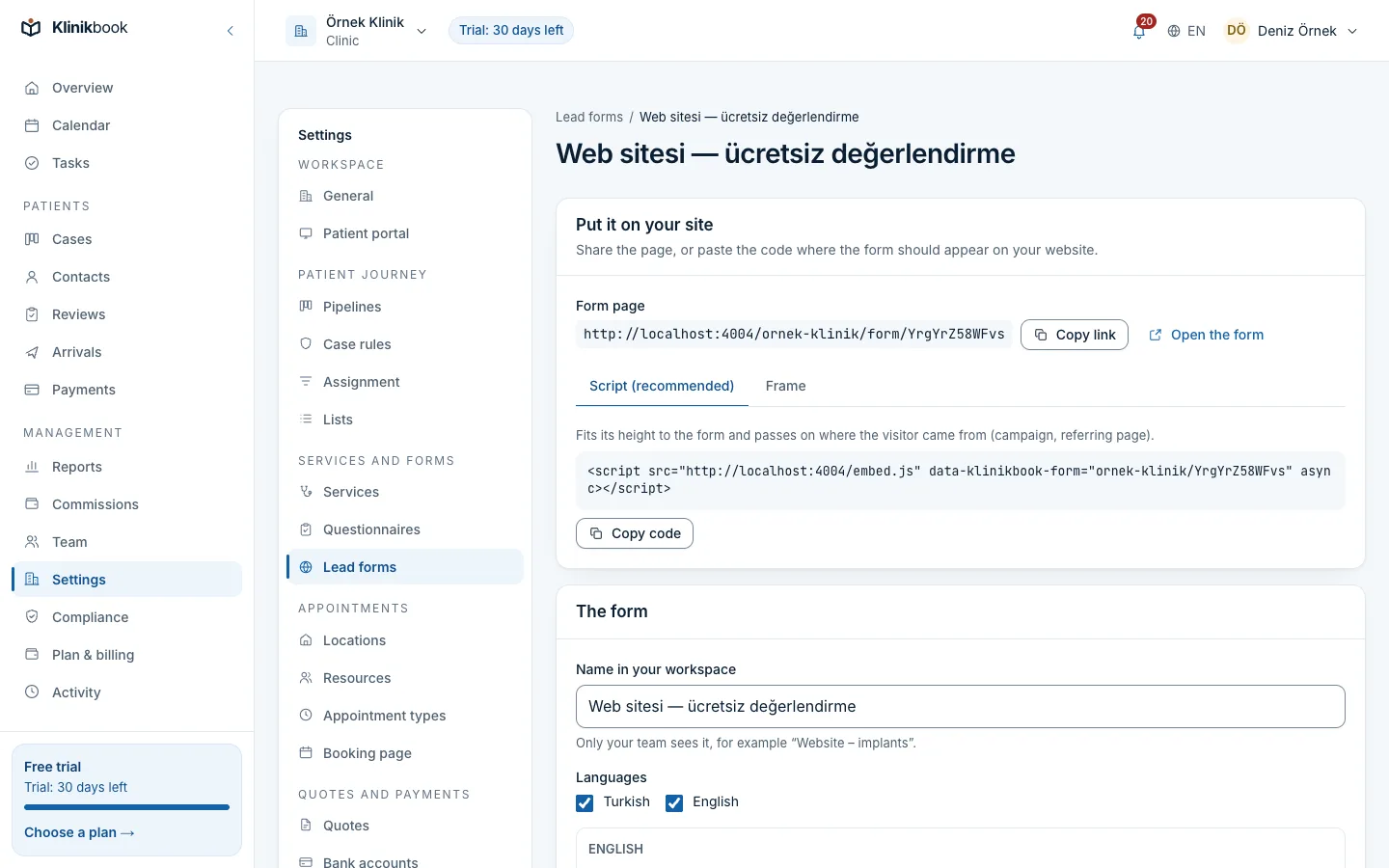
Put the form on your website
Embed the lead form with its code or share its link. Each submission finds or creates the contact, opens a case and records the UTM parameters, the referring site and the landing page.
Write assignment rules
Set rules by the contact's language, country, source and requested service; cases go in turn to that rule's coordinators. Enquiries that match no rule appear among the unassigned cases on the dashboard.
Set response targets
Set a target in minutes for the first reply and in hours for follow-ups. At 80 per cent of the time the owner is warned; if it is missed, the managers are told and the timeline records it.
Log every conversation
Call from the contact card, open the WhatsApp chat on your own phone or write an e-mail. Log the conversation on the case and open the next step as a dated task; a lost case closes with a reason picked from a list.

Frequently asked questions
What should our first-response target be?
There is no single right number; set it by your team's working hours and enquiry volume. In Turkish health tourism, USHAŞ's criterion is replying to more than 90 per cent of requests within two working days, so treat two working days as an upper limit rather than a goal.
Should I give a price in the first message?
If the patient asked about price, do not dodge the question; explain that a firm price needs the doctor's assessment and how long that takes. Give the firm price in a quote that sets out the options, what is included and how long it is valid.
What about enquiries that arrive out of hours?
Say in your form's thank-you message when you will reply, and answer those enquiries first thing on the next working day. Klinikbook's response targets do not pause outside working hours; they run from the moment the enquiry arrives, so set them with that in mind.
Do WhatsApp messages arrive in Klinikbook automatically?
No, Klinikbook has no WhatsApp integration. You open the chat from the contact card on your own phone and log the conversation on the case. Form submissions, on the other hand, become cases automatically.
When should I close a case for a patient who does not reply?
After a few planned attempts, for example if there is no answer within two weeks, close it with a reason such as ‘no reply’. If the patient gets in touch later, you can reopen the case.
Sources
- Regulation on International Health Tourism and the Health of Tourists, Article 9 (in Turkish) — Resmî Gazete, 26 April 2025
- Annex EK-2 to the regulation: performance criteria (in Turkish) — Resmî Gazete, 26 April 2025
- Law No. 6563 on the Regulation of Electronic Commerce, Article 6 (in Turkish) — Mevzuat Bilgi Sistemi
Related reading
30-day free trial
Try Klinikbook with your own team
Every feature is open for 30 days, and no card is needed to start.