
ProductQuotes and payment plans
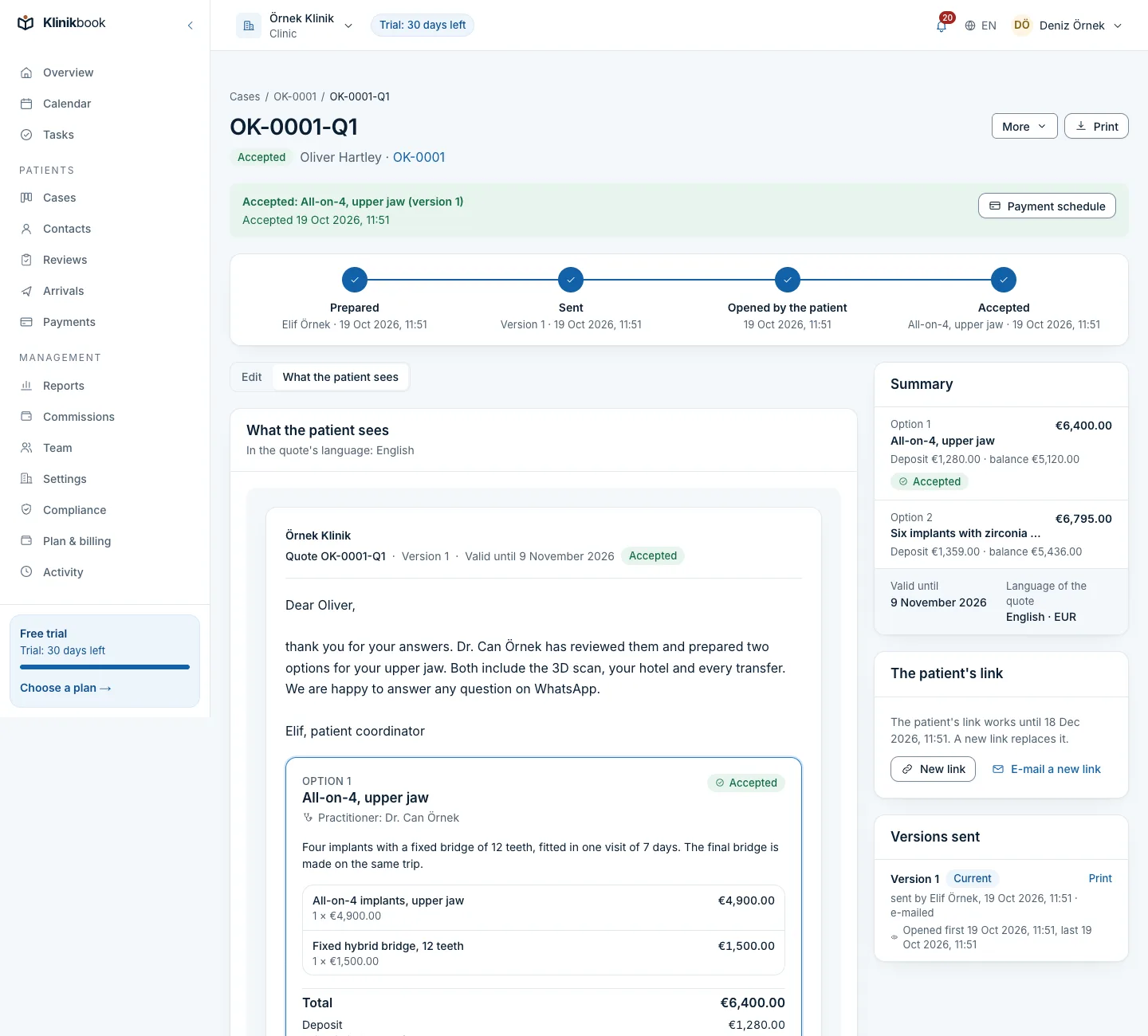
Send the quote. The patient accepts it on their phone.
In Klinikbook you build a treatment quote with options and send it by secure link; you see when the patient opens it, and when they accept on the portal the deposit and balance schedule is created. The money goes straight from the patient to you, never through Klinikbook.
- Quotes with options
- A “viewed” signal
- A payment plan on acceptance
Who follows up the quote in a Word file?
How it usually goes
- An old quote is opened and the prices changed by hand.
- Nobody knows which version went out or whether it was opened.
- Whether hotel nights were included is argued about later.
- The deposit receipt is on WhatsApp, the follow-up in a spreadsheet.
With Klinikbook
- A quote in minutes from your price list or saved packages.
- Every version sent is kept unchanged, and you see when it is opened.
- Inclusions and exclusions are spelt out on the quote.
- Acceptance creates the schedule; receipts come to you to approve.
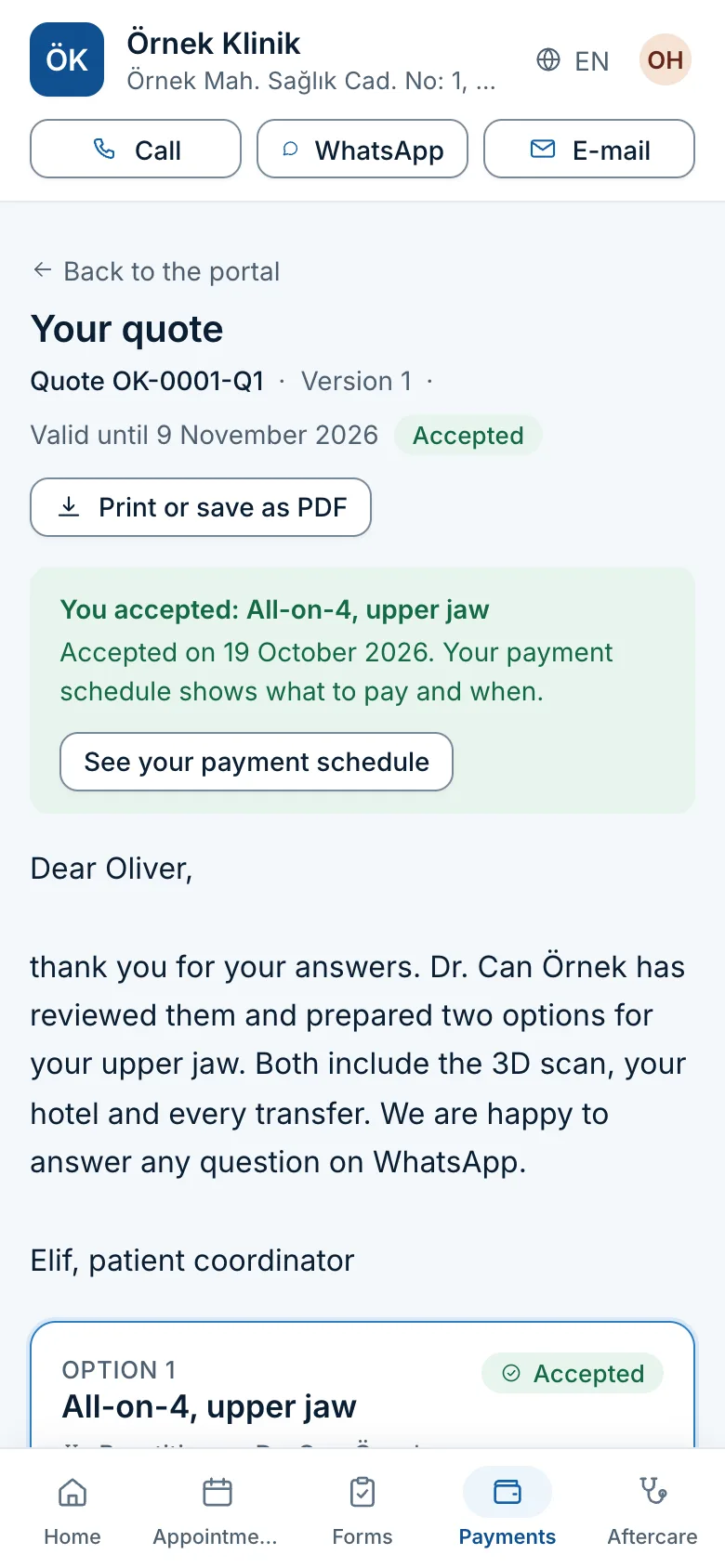
What the patient sees
Options side by side, one tap to accept
The patient opens the quote under your clinic's name, reads what is included, confirms your cancellation and refund terms and accepts an option. The acceptance is recorded with its option and version.
- Print or save as PDF
- A personal note from the coordinator
- Internal costs never shown
Payments ledger
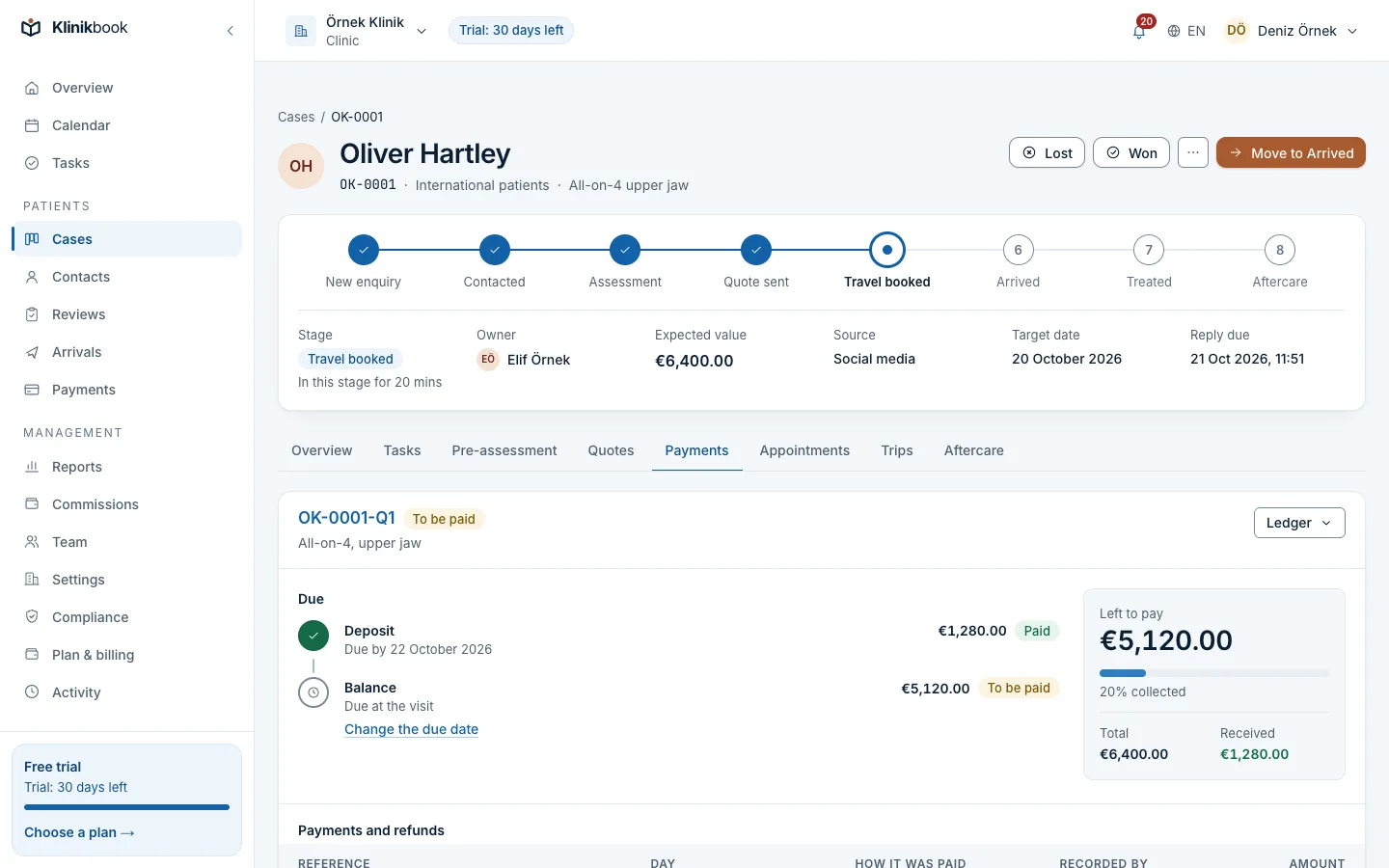
Track deposits in a schedule, not a spreadsheet
Acceptance creates the deposit and balance schedule. The patient uploads the transfer receipt on the portal; you approve it or reject it with a reason, and the patient is e-mailed at each step.
- Payments, refunds, cancellations and new due dates
- Overdue payments shown apart
- Your bank accounts with IBAN checks
What quotes and payments include
- Quotes with optionsUp to five options per quote, such as two packages with different graft counts or stays. Each with lines, quantities, discounts and tax.
- Inclusions and exclusionsSpell out hotel nights, transfers, interpreter, medicines and check-ups as included or not.
- Viewed and valid untilSee when the patient first and last opened the quote. An expired quote cannot be accepted, and you can withdraw one.
- Price lists and packagesA price list per currency; save packages such as “hair transplant + 2 hotel nights + transfer” and add them to a new quote.
- Internal costs by permissionOnly members with the permission see line costs; the practitioner role does not see payments.
From quote to payment
Prepare
The case's services come priced from your list, or you start from a saved package.
Send
E-mail the link or copy it into WhatsApp; the case moves to the quote stage.
The patient accepts
They compare the options on the portal and accept one; the deposit and balance schedule is created.
Follow the payments
The patient sees your bank accounts and transfer reference and uploads a receipt; your finance team approves it.
The money goes straight from the patient to your clinic. Klinikbook is never in between and takes no commission.
Klinikbook only records what is due when, and what has arrived.
How does the patient accept a quote?
They enter the portal through your link or an e-mail code, compare the options, confirm the terms and accept one. The acceptance is recorded with its option and version.
What happens when a quote expires?
An expired quote cannot be accepted; you send a new version with a new date. The default validity is 14 days and can be changed in settings.
Can I give the quote as a PDF?
Yes. Print any version sent with your clinic's name and address, or save it as a PDF from the browser; the patient can print theirs on the portal too.
Can I quote in different currencies?
Yes. Each quote is in one currency and you can keep a price list per currency; amounts show separately by currency in reports.
Does everyone on the team see costs and payments?
No. Only permitted members see internal costs, finance and administrator roles manage the ledger, and the practitioner role does not see payments.
Related reading
Free tools
30-day free trial
Try Klinikbook with your own team
Every feature is open for 30 days, and no card is needed to start.