
A free Excel template for planning the trips of patients who travel for treatment: travellers, flights, hotel, transfers and treatment days in one file. It counts the nights and highlights today's arrivals and any transfer in the next two days that is not yet confirmed.
On this page
What's inside?
- Trips: patient, treatment, coordinator and status for each trip, with travellers, flights, nights, transfers and treatment days counted for you
- Travellers: the patient and companions, relation, nationality, phone and, where needed, the type of travel document
- Flights: arrival or departure, date, local time, flight number and airports
- Stays: hotel, address, check-in and check-out dates, nights worked out for you, booking reference and confirmation
- Transfers: type, date, pickup time, from, to, transfer company, driver and phone, confirmation
- Treatment days: date, time, purpose, place and whether an interpreter is needed
- Colours for today's arrivals, unconfirmed transfers in the next two days and stays whose check-out comes before check-in
- A How to use sheet and editable lists
Who is it for?
Health-tourism agencies, hospitals' international patient units and clinics that welcome patients from abroad. Flight times change, a stay gets an extra night, the driver is named at the last minute; when that sits in separate messages, a patient ends up waiting at arrivals. The planner ties every part of the trip to one trip reference.
Use it in 3 steps
Give the trip a reference
On the Trips sheet give each trip a short reference (e.g. T-001) and use it on the other sheets.
Enter travellers, flights, hotel and transfers
Write flight times in each airport's local time; nights are counted for you, and each transfer goes on its own row.
Track confirmations
Set Confirmed to Yes once the transfer company confirms the time and driver; upcoming unconfirmed transfers show in yellow. Send a company only its own rows.
Klinikbook does this for you
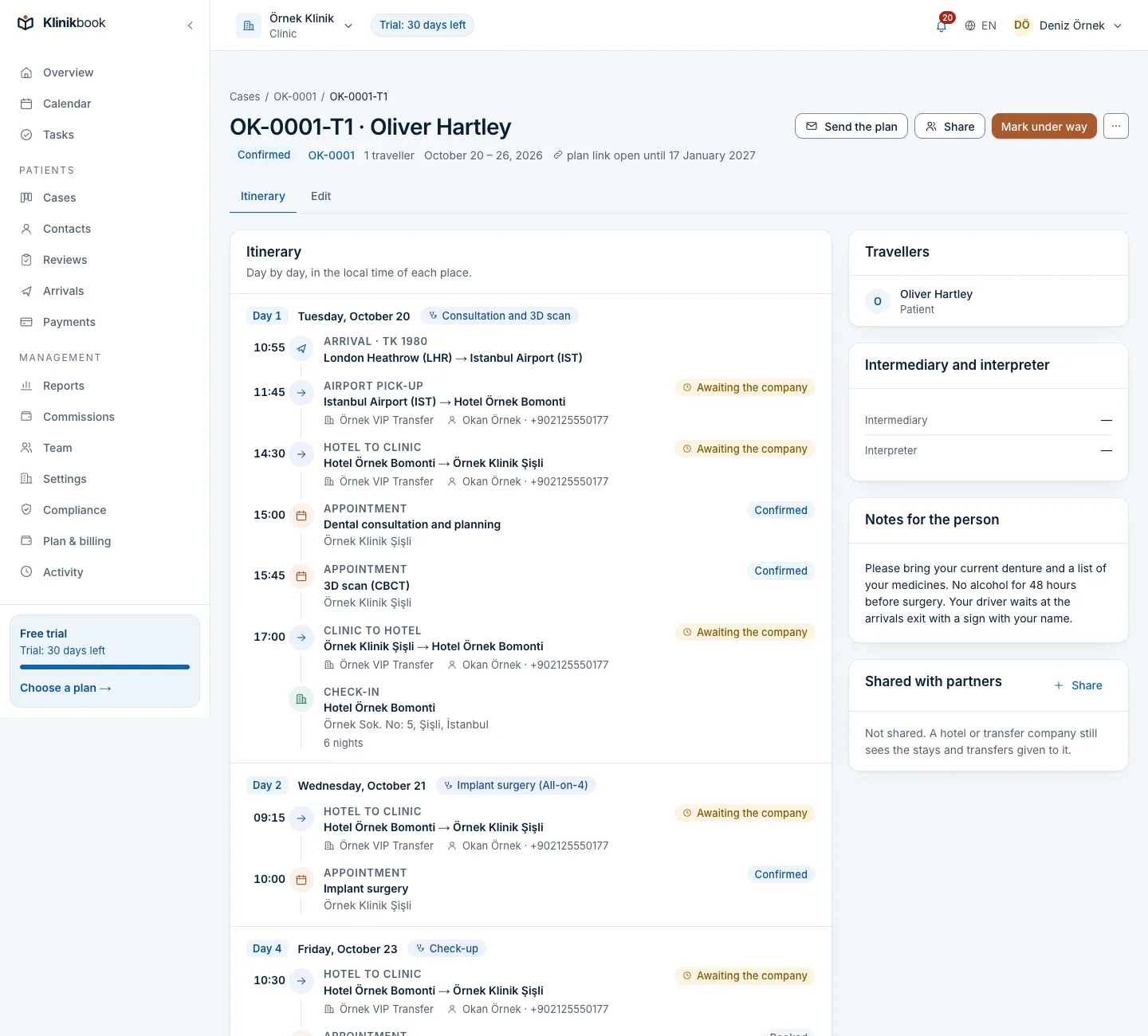
In Klinikbook the trip lives inside the patient's case: travellers, flights in local time, the stay, transfers and treatment days on one screen. Its status moves on as the dates pass, and the arrivals board shows who is landing today.
Share a trip with a hotel, transfer company or agency: their people join as guests without taking a user seat, see only what you shared and confirm transfers with the driver's name. The patient sees the itinerary on the portal.
Frequently asked questions
Is the transfer and stay planner free?
Yes. You download it without signing up or giving an e-mail address.
Which time zone should flight times be in?
Use the local time of the airport the flight leaves from or lands at, so it matches the time on the ticket.
How do I share the plan with a transfer company?
Filter the Transfers sheet by company and send only those rows. In Klinikbook a partner sees only the transfers shared with them and confirms them directly.
Can I plan several patients in one file?
Yes. Each sheet starts with 200 empty rows; rows are linked by the trip reference and the Trips sheet adds up each trip.
Does it work in Google Sheets or LibreOffice?
Yes. The formulas, drop-down lists and colours work there too, although the layout may differ slightly.
Related reading
30-day free trial
Try Klinikbook with your own team
Every feature is open for 30 days, and no card is needed to start.