
Open and narrow the report
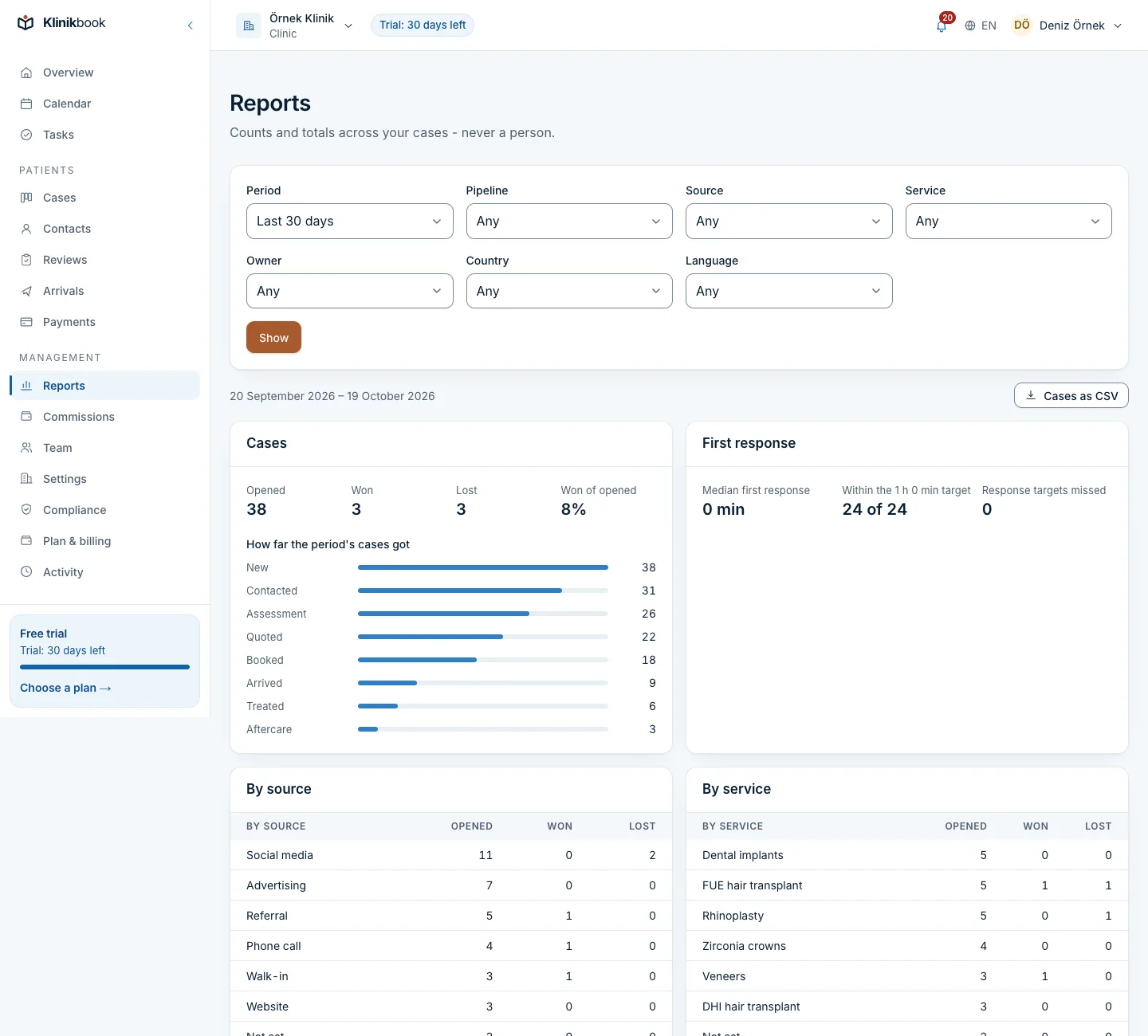
The Reports screen is open to owners, administrators, coordinators, finance and marketing.
Open Reports
In the left menu, under Management, choose Reports.
Choose the period
Last 7 days, Last 30 days, Last 90 days, This month, Last month, This year or Chosen days. The period is days in your workspace's time zone, up to a year.
Use the filters
Narrow by pipeline, source, country, language, service and owner. Any filter besides the period narrows the cases, and the money, appointments, trips and aftercare follow the same cases.
Read the sections
Cases (opened, won, lost, first response time, the same counts by source, country, language, service and owner), money, appointments, trips and aftercare.
Share or download
The filters live in the address, so you can send the link to your team. “Cases as CSV” downloads the cases behind the report.
Frequently asked questions
Can I get a report on one patient?
No. Reports give counts and totals. For one person's record open their contact or case page.
What is in the CSV?
One row for each case opened in the period: reference, dates, status, stage, source, country, languages, services, owner and the minutes to the first response.
Related reading
30-day free trial
Try Klinikbook with your own team
Every feature is open for 30 days, and no card is needed to start.