
SolutionsClinic CRM software
Clinic CRM software: from enquiry to aftercare in one place
Klinikbook is a clinic CRM: it records every enquiry and patient as a contact and a case, assigns it to the right person and runs the patient relationship from intake to quote, appointment and aftercare in one place. It keeps no examination notes, diagnoses or prescriptions; it works next to your clinical records software, not in its place.
- Every enquiry a case, with its source
- Quote, appointment and aftercare on one record
- 30-day free trial, no card
What is a clinic CRM?
A clinic CRM is software that manages a clinic's relationship with its patients and prospective patients. It records the enquiry that arrives by phone, form or message, and shows who is handling it, when it needs a reply, which quote is open and what the patient does next. Its purpose is that a patient who enquires is not lost to the team's disorganisation.
In a working day it does this: a new enquiry lands with a coordinator, a warning comes before the reply target runs out, the patient fills in the intake form, the doctor reviews the photos, a quote goes out, and once it is accepted a payment schedule and an appointment appear. When treatment is done, check-in tasks begin. All of it moves along one patient record.
Board
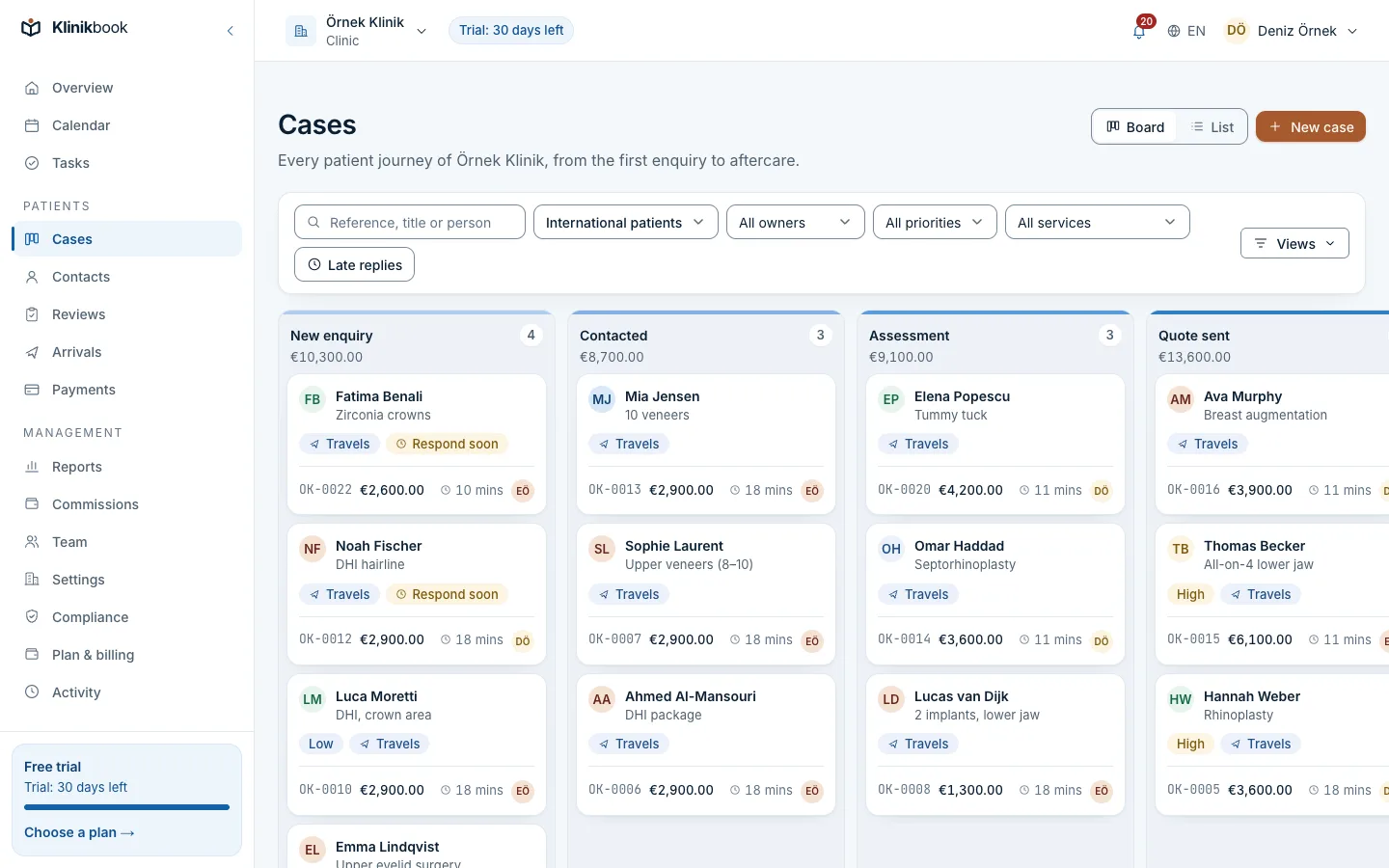
Every enquiry a case, every case a card with an owner
Cases sit on the board by stage. You see at a glance who holds each one, when its reply target runs out and which case is waiting.
- Assignment by rule
- Reply target and overdue warning
- Tasks and internal notes
Enquiry
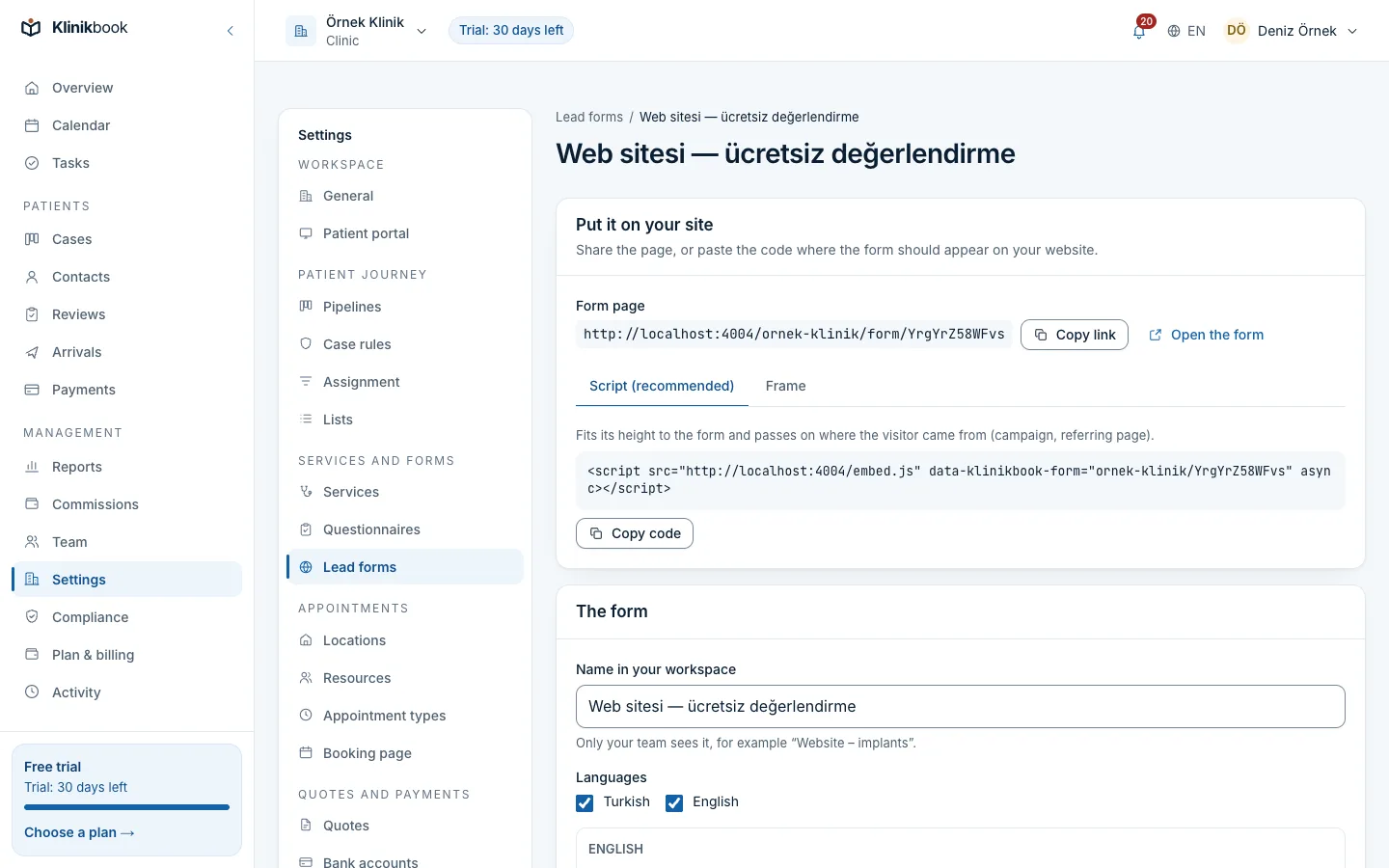
The form on your site becomes a case, with its source
The lead form embeds in your site; the campaign (UTM) and source are written to the record. The reports then show which channel really brings patients.
- Turkish and English form
- Source and UTM recorded
- If a questionnaire is chosen, the patient form opens on submit
What a clinic CRM covers, and where it is in Klinikbook
- Collecting enquiries
- In KlinikbookEmbeddable form, source and UTM recorded
- Patient and case tracking
- In KlinikbookBoard, assignment, reply target, tasks, notes
- Conversations
- In KlinikbookA conversation per case (portal and e-mail); WhatsApp and SMS replies too when you connect your own account
- Medical intake
- In KlinikbookGuided photo form, doctor review queue
- Quotes and payment plans
- In KlinikbookQuotes with options, packages, branded PDF; payment schedule recorded
- Appointments
- In KlinikbookDoctor, room and device calendar, online booking page, e-mail reminders
- Aftercare
- In KlinikbookCheck-in plans, patients answer on the portal with photos
- Reports
- In KlinikbookFunnel by source, response times, no-show rate, collections
- Automation
- In KlinikbookSimple rules on a stage, a delay or an event
- Compliance
- In KlinikbookKVKK/GDPR texts, consent records, data requests
Who is a clinic CRM for?
- Clinics whose enquiries are scattered across phone, forms and messages
- Coordinator teams who notice replies going out late
- Clinics that send quotes but cannot follow them up
- Centres that look after local and international patients together
- Private practices with more than one member of staff
Clinic CRM, clinical records software and a general CRM compared
- Focus
- Clinic CRM (Klinikbook)Patient relationship and operations
- Clinical records software (HBYS/EHR)Medical records and consultations
- General-purpose CRMSales in any industry
- Enquiry and quote tracking
- Clinic CRM (Klinikbook)Yes, ready for clinics
- Clinical records software (HBYS/EHR)Usually limited
- General-purpose CRMYes, but you build it
- Clinic workflows (intake, aftercare)
- Clinic CRM (Klinikbook)Ready out of the box
- Clinical records software (HBYS/EHR)Record-centred
- General-purpose CRMBuilt from scratch
- Medical records
- Clinic CRM (Klinikbook)Not kept
- Clinical records software (HBYS/EHR)Kept
- General-purpose CRMNot kept
How to choose a clinic CRM
- Does it record where an enquiry came from (form, campaign)?
- Does every case have an owner and a reply target?
- Do you see the quote, deposit and appointment on the same record?
- Is there a portal the patient can open and fill in?
- Are the KVKK/GDPR texts and data requests ready?
- Is the price per workspace or per user, and is the trial card-free?
What is a clinic CRM?
A clinic CRM is software that manages a clinic's relationship with patients and prospective patients: it records the enquiry, shares it out, and follows the quote, appointment and aftercare. It keeps no medical records; that is the job of your clinical records software.
Is a clinic CRM the same as clinical records software (HBYS/EHR)?
No. Clinical records software holds consultations, diagnoses and prescriptions. A clinic CRM runs the patient relationship from enquiry to quote and from appointment to aftercare. Klinikbook is the second kind and does not replace the first; clinics use both.
Is clinic CRM software free?
Klinikbook has no free plan; you can try it free for 30 days with no card. After that you pay for one of the Solo, Team or Pro plans, priced per workspace. Current prices are on the pricing page: /en/pricing.
Why a clinic CRM instead of a general-purpose CRM?
Fitting a general CRM to a clinic means building the intake form, doctor review queue, quote and payment schedule, appointments and KVKK texts yourself. A clinic CRM comes with them.
Can we use it alongside our existing clinical software?
Yes, they run separately. The patient relationship and operations live in Klinikbook; medical records stay in your clinical software. There is no connector or API, but you can import and export contacts as CSV or spreadsheets.
Does a clinic CRM send patients SMS or WhatsApp messages?
Yes, over your own account and only if you want. Klinikbook has no SMS or WhatsApp account of its own; you connect your Netgsm, İleti Merkezi, Twilio or WhatsApp Cloud API account. Informational messages such as appointment, payment and quote notices go through it; e-mail is the default and the fallback. Your provider bills the messages to you.
How does the trial start?
When you sign up and set up your workspace, the 30-day trial starts on its own and no card is asked for. If you choose your treatments, the services, forms and KVKK texts come ready.
Try the clinic CRM in your own clinic
Free for 30 days, no card needed. Plans are priced per workspace; see the pricing page.
Related reading
Free tools
30-day free trial
Try Klinikbook with your own team
Every feature is open for 30 days, and no card is needed to start.