
SolutionsPatient management software
Patient management software: no patient lost between stages
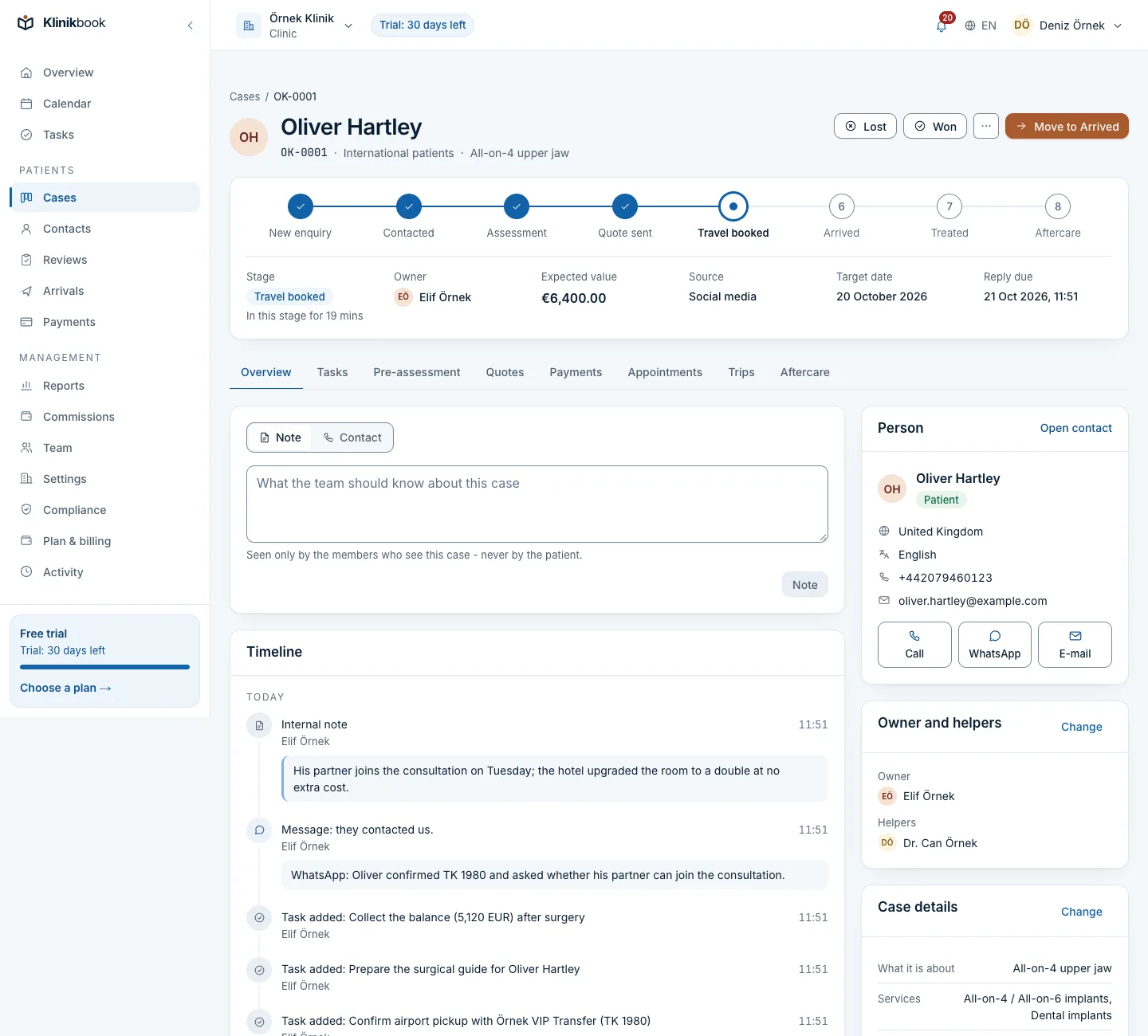
Klinikbook is patient management software: it follows every enquiring patient as a case and shows, on one record, who is handling it, what stage it is at, whether a quote is open, whether an appointment is booked and when the aftercare check is due. It keeps no medical records; examinations and diagnoses stay in your clinic's records software.
- Every patient a case with an owner
- Warnings for late replies and check-ins
- Patient portal and aftercare plans
What does patient management software do?
Patient management software shows where a patient is, from their first contact with the clinic to the check-up after treatment. In Klinikbook each patient is a contact card and one or more cases; a case sits at a stage, has an owner and warns before its reply target runs out.
Tracking is not only "did we call": it includes whether a sent quote was opened, the state of the deposit and instalments, whether the patient came to the appointment and whether they answered the aftercare question. Our guide goes into the subject in more depth: Patient tracking software.
Case
The patient's whole story in one case
The timeline holds the conversation, tasks, quote, payments and appointments together. Whoever takes over a case carries on without asking for the history.
- A timeline
- Tasks and internal notes
- Quote, payments and appointments in one place
After treatment
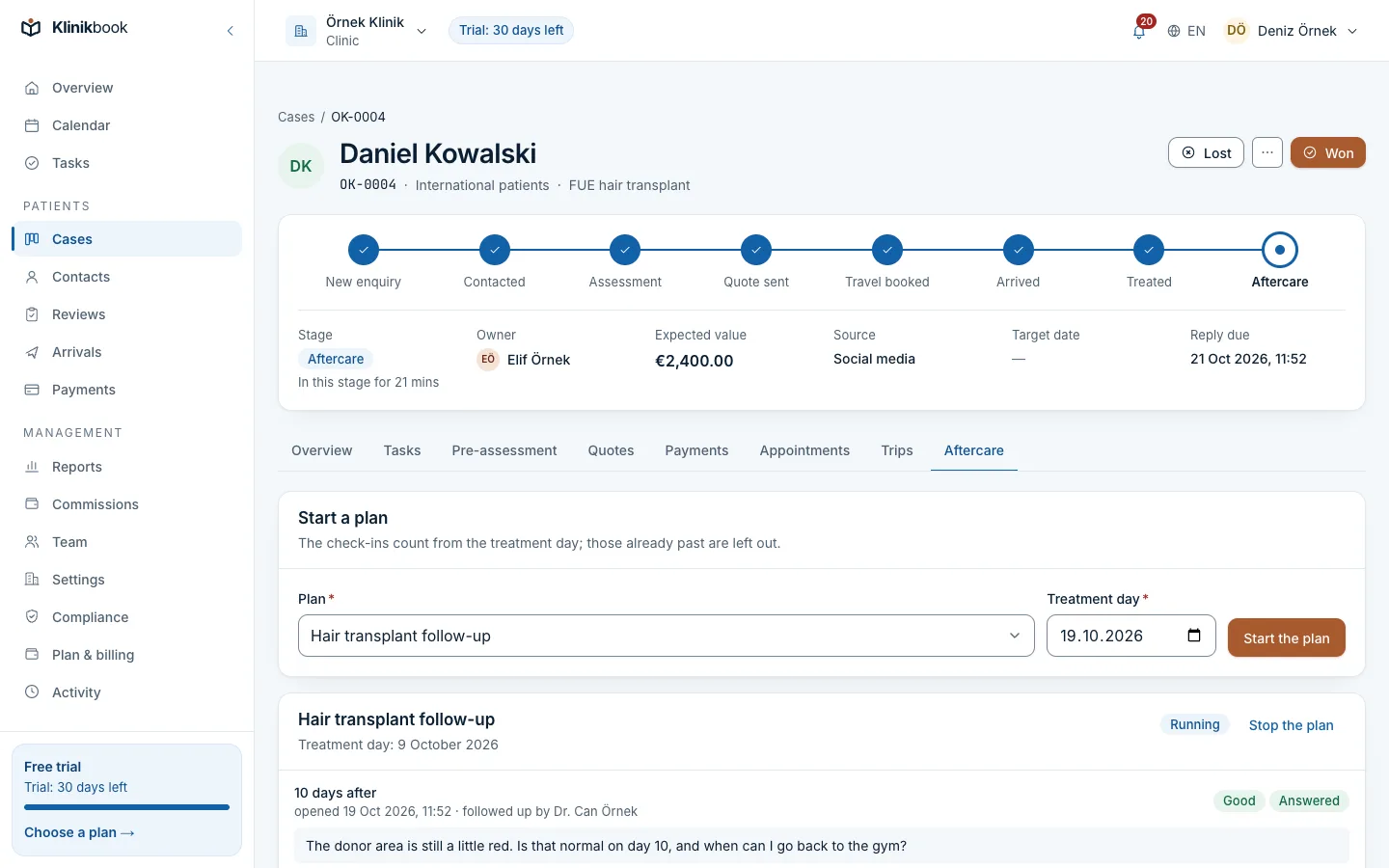
When check-in day comes, the follow-up starts itself
A plan per service starts on the case; on the day, the patient gets an e-mail and the team gets a task. The patient answers on the portal, with photos if needed.
- A plan per service
- E-mail and task
- Answers with photos on the portal
What Klinikbook tracks for each patient
- The enquiry and its source
- In KlinikbookForm, UTM and source recorded
- Owner and reply time
- In KlinikbookAssignment by rule, reply target, overdue warning
- Medical intake
- In KlinikbookForm, photos, doctor review
- Quote and payment
- In KlinikbookQuote opened, accepted, payment schedule recorded
- Appointment and no-shows
- In KlinikbookCalendar, e-mail reminder, no-show count
- After treatment
- In KlinikbookAftercare plan, task, answer on the portal
- Conversation
- In KlinikbookOne per case; WhatsApp messages too when your own account is connected
- Search
- In KlinikbookGlobal search across records, Cmd/Ctrl+K
Who is it for?
- Clinics tracking patients in spreadsheets and on the phone
- Centres where the reply after a quote gets forgotten
- Teams that want fewer no-shows
- Clinics with several coordinators and doctors
How to choose patient management software
- Is each patient's stage and owner visible?
- Does it warn the team when a reply is late?
- Are the quote, payment and appointment on one record?
- Does it start the aftercare check-ins?
- Does it report conversion by source?
- Is patient data protected in line with KVKK/GDPR?
What is patient management software?
Patient management software shows what stage a patient is at from enquiry to aftercare, who is handling them and what the next step is. Klinikbook does this with a case board, tasks and aftercare plans.
Is patient management software free?
Klinikbook has no free plan; you can try it free for 30 days with no card. After that you pay for one of the Solo, Team or Pro plans, priced per workspace. Current prices are at /en/pricing.
What is the difference between patient management software and clinical records software?
Patient management software follows the relationship and the process: enquiry, quote, appointment, check-up. Clinical records software keeps the medical record: examination, diagnosis, prescription. Klinikbook is the first; clinics use both.
Is tracking patients in a spreadsheet enough?
At low volume it can be; the trouble is that nobody reminds you of a reply time, an unopened quote or a check-up date. Patient management software turns those into warnings and tasks. For a comparison see Klinikbook and spreadsheets and messaging.
Does patient management software reduce no-shows?
Appointment reminders go out by e-mail, the patient confirms or cancels on the portal and the no-show rate appears in the reports. Reminders go by e-mail by default, or by your own SMS or WhatsApp account if you connect one.
Do patients log in to the system?
There is a patient portal: the patient signs in with an e-mail code, no password, and sees their form, quote, payment schedule and appointments. The portal works in six languages (Turkish, English, German, Arabic, Russian, French).
Is patient data safe?
Intake answers, case notes and messages are stored encrypted at field level, and uploaded files are virus-scanned. The compliance centre manages KVKK/GDPR texts and data requests.
Try patient tracking free for 30 days
Free and card-free. Plans are priced per workspace; see the pricing page.
Related reading
Free tools
30-day free trial
Try Klinikbook with your own team
Every feature is open for 30 days, and no card is needed to start.