
Google reviews and patient reviews: what clinics can and cannot do
Published 23 October 2026Reviewed 23 October 202610 min read
On this page
Why do patient reviews matter so much, and why are they sensitive?
When a prospective patient searches for a clinic on Google, the rating and the reviews are among the first things they see. They build trust because, unlike what the clinic says about itself, they are the voice of a third party. For the same reason they are carefully regulated in healthcare: reviews touch Google's policies, health-advertising rules and patient privacy all at once.
There are three separate questions, each with its own rule: asking for a review, replying to a review, and sharing a review on your own channels. Each is covered below.
What can you do and what can't you?
- Asking for a review
- You canSend every patient the same link or QR code to share their genuine experience.
- You cannotGive a discount, gift, payment or favour for a review; offer anything to have a negative review removed or changed.
- Whom to ask
- You canEveryone who has completed treatment, with the same message.
- You cannotPick only patients who seem happy; prevent or discourage negative reviews.
- Review content
- You canTell the patient they can write the review in their own words.
- You cannotAsk for specific content, a rating, or a staff member's name; set staff a target number of reviews.
- Replying
- You canWrite a short, polite, general reply as the verified business; move the concern to a private channel.
- You cannotState in the reply that the person is your patient, or mention their treatment or health.
- Sharing on your own channels (domestic)
- You canNot even to say thank you; the regulation bans advertising-style sharing.
- You cannotScreenshot a review onto your account, or add a review section or star-rating widget to your site (risky, see below).
- Sharing on your own channels (abroad, authorised)
- You canPublish stories, reviews and thanks with the patient's documented explicit consent, respecting patient privacy and rights.
- You cannotPublish content without consent or after consent has been withdrawn.
What does Google say about asking for reviews?
Under Google's Maps contributed-content policy, businesses may ask customers for reviews based on genuine experiences, but may not offer incentives such as payment, discounts, free goods or services in exchange for a review, a revision or the removal of a negative review. Reviews written because of incentives are removed. The policy also bars businesses from discouraging or prohibiting negative reviews, selectively soliciting only positive ones, requiring customers to review while on the premises, asking for specific review content, and requiring staff to collect a set number of reviews or reviews with specific content. Reviews based on a conflict of interest, such as those from current or former employees, consultants, competitors or family members, are also prohibited.
The consequence may be more than a deleted review: Google can remove reviews, temporarily block new ones and show a warning on the business profile. One bad decision can affect the clinic's whole reputation.
Why is being selective when asking for reviews prohibited?
Many clinics ask “how did it go?” in the aftercare message and send the review link only to those who say “great”. This is what Google calls review gating, and it is prohibited. The fix: either send the same review link to everyone or send it to no one; collect private feedback on a separate path, but do not make the review link depend on the answer.
A good practice: the aftercare e-mail goes to everyone on the same day and presents the private-feedback question and the Google review link side by side, in the same form.
How do you write a review request?
The text below is neutral: it promises nothing in return, does not ask for a positive review and goes to everyone alike.
- “Hello Anna, thank you for choosing our clinic. If you would like to share your experience with other patients, you can leave a Google review here: [link]. A review is entirely optional; if you have a question about your health, write to us directly.”
- Do not add anything that steers the content (“I'd be glad of five stars”).
- Do not mention treatment details; it is enough that the message contains no health data.
- Send it to everyone, automatically or by hand, on the same aftercare step on the same day.
How should you reply to a review?
To reply on Google your business must be verified; the reply appears as from your business and the reviewer is notified. Replies are checked against Google's content policies, and the reviewer can change their review afterwards.
Privacy is the big trap. A sentence like “we're glad your treatment went well” or “you did not come to your check-up after your implant surgery” tells the public that the reviewer is your patient and what treatment they had. Health data is special-category personal data under KVKK, and the fact that the patient mentioned it in their own review does not give you the right to repeat it. Keep replies general and unconfirming, and discuss specifics privately.
Sample replies
- A positive review
- Reply“Thank you for your valuable feedback. We have passed it on to our team. If you have any questions, you are always welcome to write to us.”
- A negative review
- Reply“We are sorry about your experience. We would like to talk with you directly and understand what happened; please contact us at [phone / e-mail].” Do not put identity, dates, treatment or medical detail in the reply.
- A review you believe is unfair or fake
- ReplyWrite a calm, general reply and report the review as breaching Google's content policy. Do not argue the details.
- A review from a competitor, employee or acquaintance
- ReplyGoogle's policy prohibits reviews based on a conflict of interest; report the review and do not reply.
Can you share reviews on your website or social media?
Not on channels aimed at people in Türkiye. The Regulation on Promotion and Information Activities in Health Services bans advertising-style sharing based on thank-you or satisfaction statements by patients or their relatives in the press, publications, social media and websites, and states that patient reviews and thank-you messages are covered. For image posts, such statements cannot be used for advertising even if made elsewhere.
Adding a widget that shows Google reviews to your site, or featuring your average rating, may also fall under this ban. The regulation does not mention that exact case, so ask your provincial health directorate or lawyer before putting a widget live.
On the authorised channel aimed abroad, Article 8 permits patient stories, reviews and thanks, on condition that patient privacy, public morality and patient rights are respected and the patient's explicit consent is documented. Take consent in writing and keep a way to withdraw it open.
Review management checklist
- The review request goes to everyone in the same form on the same step.
- The message contains no reward, discount, gift or rating expectation.
- Private feedback and the Google review link are not conditional on each other.
- Staff have no target number of reviews; employees and their relatives do not review the clinic.
- Replies are general; they do not say who is a patient or what treatment they had.
- Negative reviews are moved to a private channel within 48 hours; fake or rule-breaking reviews are reported to Google.
- No patient reviews, thank-yous or rating widgets on the domestic account and site.
- Every patient story shared on the abroad channel has written consent and can be withdrawn.
How is this done in Klinikbook?
Klinikbook does not read, write or answer Google reviews; it helps you run the review request as a message sent to everyone alike, with a separate feedback path.
Make the review request a template
Write a neutral review request in message templates with the clinic and patient name fields, and add versions in the patient's language.
Send it to everyone on the same step
A simple automation rule can send the template by e-mail when an appointment is completed or at an aftercare step, with no filter. Because it applies to everyone, it cannot become review gating.
Collect private feedback separately
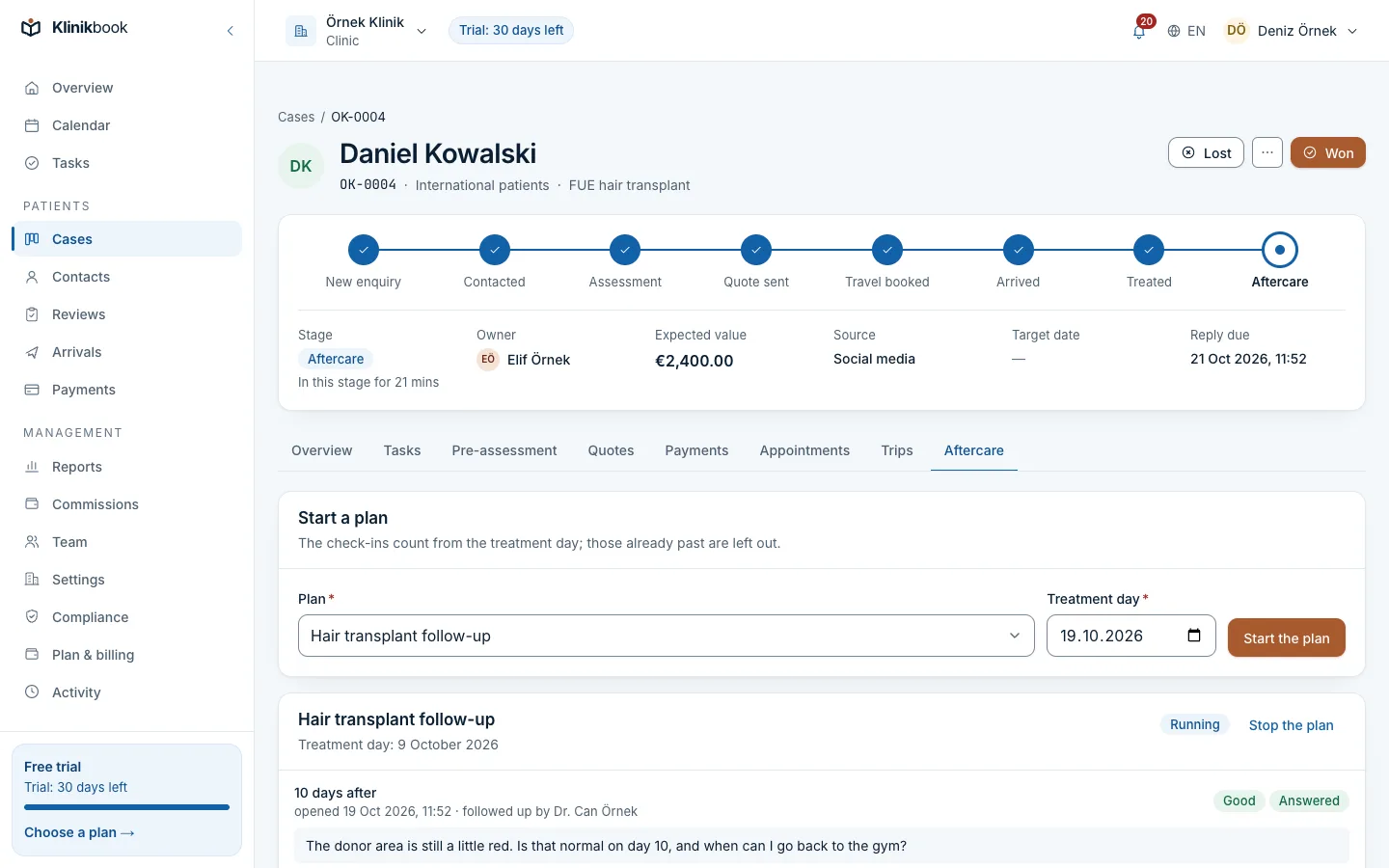
The aftercare plan asks the patient about their health and questions on set days; the answers appear on the case and the team contacts the patient if needed.
Record photo and marketing consent
If you will share patient stories on the channel aimed abroad, take consent in the portal; it is kept on the contact card with its channel and date, and the patient can withdraw it.
Aftercare
Private feedback goes on a separate path
When follow-up days arrive the patient answers questions by e-mail. A patient with a problem reaches the team; a happy patient can write a review of their own accord.
- Answers appear on the case
- Scheduled check-ins
- E-mail in the patient's language
Compliance centre
Consents are versioned and can be withdrawn
Photo/video and marketing consent texts are published; the patient's decision stays on the contact card with its channel and date.
- Consent can be withdrawn
- Text versions
Frequently asked questions
Can I ask my patients for a Google review?
Yes. Google allows businesses to ask for reviews based on genuine experience. You must not reward them, pick only those who seem happy or dictate the content. Because the health-advertising regulation also bans incentives and gifts, promising anything in return is a second risk.
Can I give a discount or gift to people who write a review?
No. Google prohibits offering payment, discounts or free services for a review or for removing one, and the health-advertising regulation prohibits making health services the subject of marketing such as incentives and gifts.
How should I reply to a negative review?
Write a short, calm, general reply and invite the person to a private channel (phone or e-mail). Do not state the person's identity, treatment or health in the reply; this is special-category personal data under KVKK.
Can I have an unfair review removed?
You cannot delete it yourself; you can report a review you believe breaches Google's content policy, and Google decides. A review being negative is not enough for it to be removed.
Can I show Google reviews on my website?
On a site aimed at people in Türkiye, sharing patient reviews as advertising is banned by the regulation; ask your provincial health directorate or lawyer before adding a review widget. On the abroad-aimed site of an authorised facility, patient reviews may be published with the patient's documented explicit consent.
Does Klinikbook manage Google reviews?
No. Klinikbook does not read, write or answer Google reviews. Message templates, simple automations and the aftercare plan help you apply the review request to everyone alike.
Sources
- Maps User Contributed Content Policy: Prohibited and restricted content — Google Maps Help, Current page
- Read and reply to Google reviews — Google Business Profile Help, Current page
- Regulation on Promotion and Information Activities in Health Services, Articles 5, 7, 8 (in Turkish) — Resmî Gazete, no. 33075, 12 November 2025
- Regulation on Commercial Advertising and Unfair Commercial Practices, Article 16 (testimonials) (in Turkish) — Resmî Gazete, no. 29232, 10 January 2015 (as amended)
- Law No. 6698 on the Protection of Personal Data, Article 6 (special-category data) (in Turkish) — Mevzuat Bilgi Sistemi, Current text
Collect feedback in an orderly way
Try Klinikbook free for 30 days, no card needed. Every plan has every feature.
Related reading
30-day free trial
Try Klinikbook with your own team
Every feature is open for 30 days, and no card is needed to start.