
I sent a quote and the patient is not replying: how to follow up
Published 23 October 2026Reviewed 23 October 20269 min read
On this page
Why do patients go quiet?
There are a few common reasons and each has a different remedy. The quote may never have been seen: the e-mail landed in spam, or the link was missed. It may have been seen with a question left hanging: an item, the deposit, a date, who the doctor is. The price may be being compared with another quote. Trust may be lacking. Or the timing is wrong: leave, budget, a family decision, flights.
So the first job, rather than guessing, is to learn what you can measure: was the quote opened? If so, when? If not, the issue is not the patient’s decision but the quote reaching them.
When do you follow up? A timeline
This pattern is a starting point; adapt it to your quote validity and patient type. Test the numbers on your own data and change them.
- The day the quote goes out
- SituationAlways
- What to doTell the patient it is coming and confirm with a short message that it arrived
- 1–2 days later
- SituationQuote not opened
- What to doResend the link; try another channel (a portal link or a call if you used e-mail)
- 2–3 days later
- SituationOpened, no reply
- What to doAsk a question: “Is there anything in the quote you would like me to clarify?”
- 5–7 days later
- SituationStill silent
- What to doOffer something new: a short call with the doctor, information on similar cases, a payment-plan option
- A few days before validity ends
- SituationQuote about to expire
- What to doState the expiry and, if relevant, until when the date reservation can be held
- On the validity date
- SituationNo reply
- What to doA respectful closing message: leave the door open and say how to ask for a new quote
Rules for a follow-up message
- Keep it short: one question or one suggestion.
- Offer something different each time; do not repeat “did you see the quote?”.
- No pressure and no false urgency. If a real deadline exists (validity date, doctor’s diary) say so; if not, do not invent one.
- Make no medical guarantees and no promises about results.
- Match the channel to the patient’s; instead of repeating the same channel, try a different one on the second contact.
- Write in the patient’s language.
- If the patient says they are not interested, accept it, record it and stop following up.
- Promotional messages need the patient’s consent; follow-up should concern the quote they asked for. Clarify the detail with a lawyer.
Message samples (adapt to your clinic)
- Quote not opened (day 1–2)
- SampleHello {name}, I wanted to check that our quote reached you. Here is the link again: {link}. If it does not open, tell me and I will send it another way. {member}, {clinic}
- Opened, no reply (day 2–3)
- SampleHello {name}, you may have had a chance to look at the quote. Is there an item, date or payment term you would like me to clarify? I can answer, or ask our doctor.
- A new benefit (day 5–7)
- SampleHello {name}, if useful I can arrange a 10-minute call with our doctor so you can ask your questions before deciding. We can also split the deposit into two parts. Which would help?
- Validity ending
- SampleHello {name}, your quote is valid until {date}. After that I will need to re-check prices and dates. If you would like to go ahead, just reply here.
- Respectful close
- SampleHello {name}, as I have not heard back I will close the quote. Whenever your plans change, reply to this message and we will prepare a new one together. I wish you well with your decision.
Objections: price, trust, timing
An objection is often not voiced unless asked. Naming the issue and listening works better than a discount.
- Price
- What you hear“Cheaper elsewhere”, “over my budget”
- How to approach itAsk whether they compare like for like (what is included, which materials, how many check-ups). Offer a payment plan or phasing. Do not cut the price without a reason; change the scope to offer an option.
- Trust
- What you hearSilence, “I’m thinking”, questions about the doctor or clinic
- How to approach itA call with the doctor, real result examples (within consent and legal limits), authorisation and registration details, clear cancellation terms. Avoid exaggerated promises.
- Timing
- What you hear“Not right now”, no date
- How to approach itDo not force a date; state clearly the validity of the quote and when a date really needs to be fixed. Promise a reminder for a later date and keep the promise.
- Joint decision
- What you hear“I will talk to my partner”
- How to approach itOffer a short summary or the PDF quote that the partner can read too, and offer to answer their questions.
When do you stop?
If there is no reply after three or four meaningful contacts and the quote’s validity date has passed, send the closing message and close the case as lost, recording the reason (price, trust, timing, no reply, another clinic). That reason is the most valuable data for seeing which objection comes up most.
Stopping does not end the relationship: the closing message leaves the door open. If the patient returns later you still have the case and conversation history. Never keep calling a patient who has said no.
How do you set quote validity?
Validity says how long the price and dates can be held. Too short pressures the patient; too long and prices or the diary change. Set it based on the doctor’s diary, materials and exchange-rate movement, and state it plainly in the quote. Tell the patient clearly that after expiry you are not bound to the same price but can continue with a new quote.
How do you measure the effect of follow-up?
- Quote acceptance rate
- FormulaQuotes accepted / quotes sent
- What it teachesHow the rate moves as your follow-up routine changes
- Open rate
- FormulaQuotes opened / quotes sent
- What it teachesWhether quotes reach patients
- Time to open
- FormulaTime from sending to first open (median)
- What it teachesWhen to send the reminder
- Time to accept
- FormulaTime from sending to acceptance (median)
- What it teachesHow long the follow-up window should be
- Lost reasons
- FormulaCases closed per reason
- What it teachesWhich objection is most common
- Accepted after follow-up
- FormulaQuotes accepted after a follow-up / quotes followed up
- What it teachesWhether follow-up works
How do you do it in Klinikbook?
Send the quote by secure link
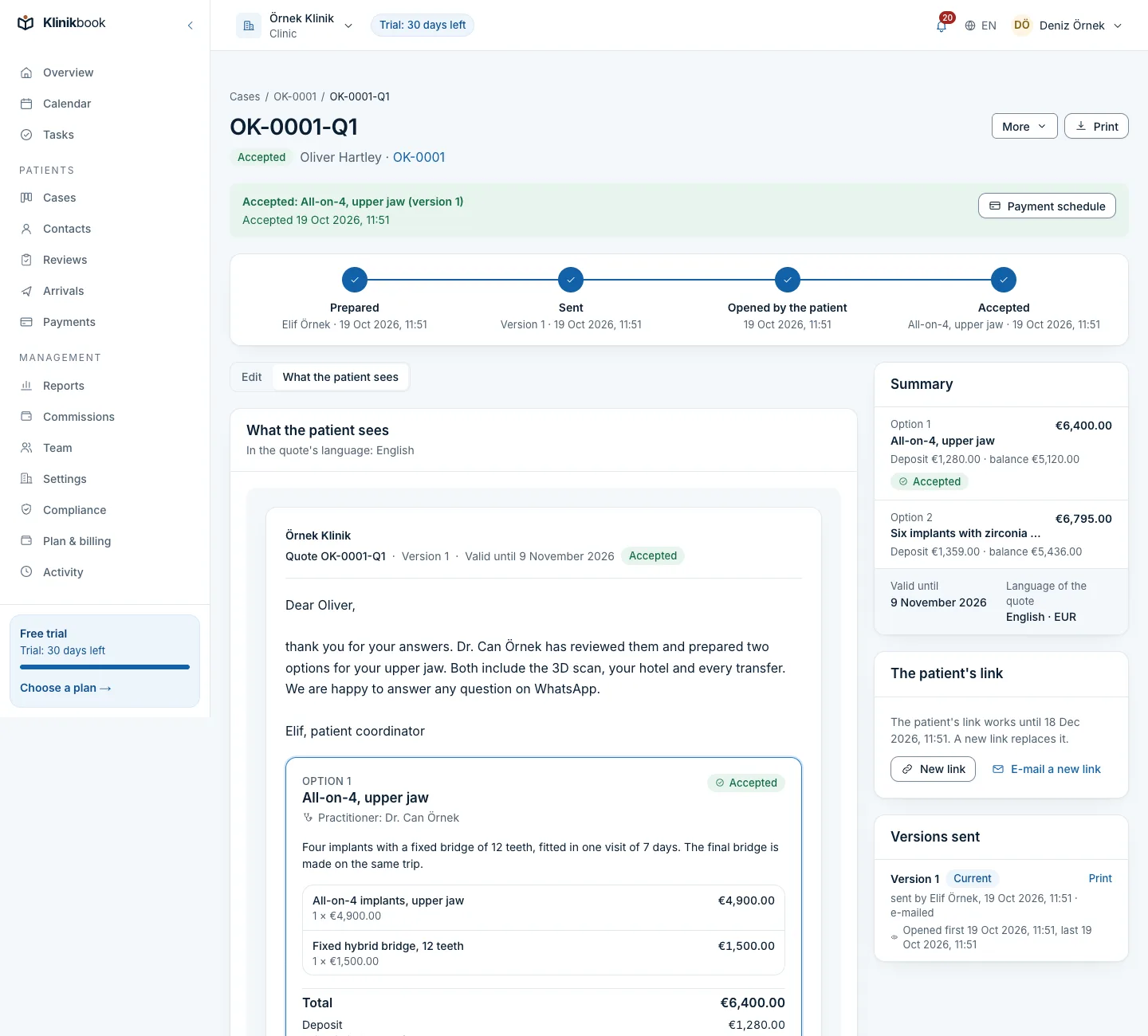
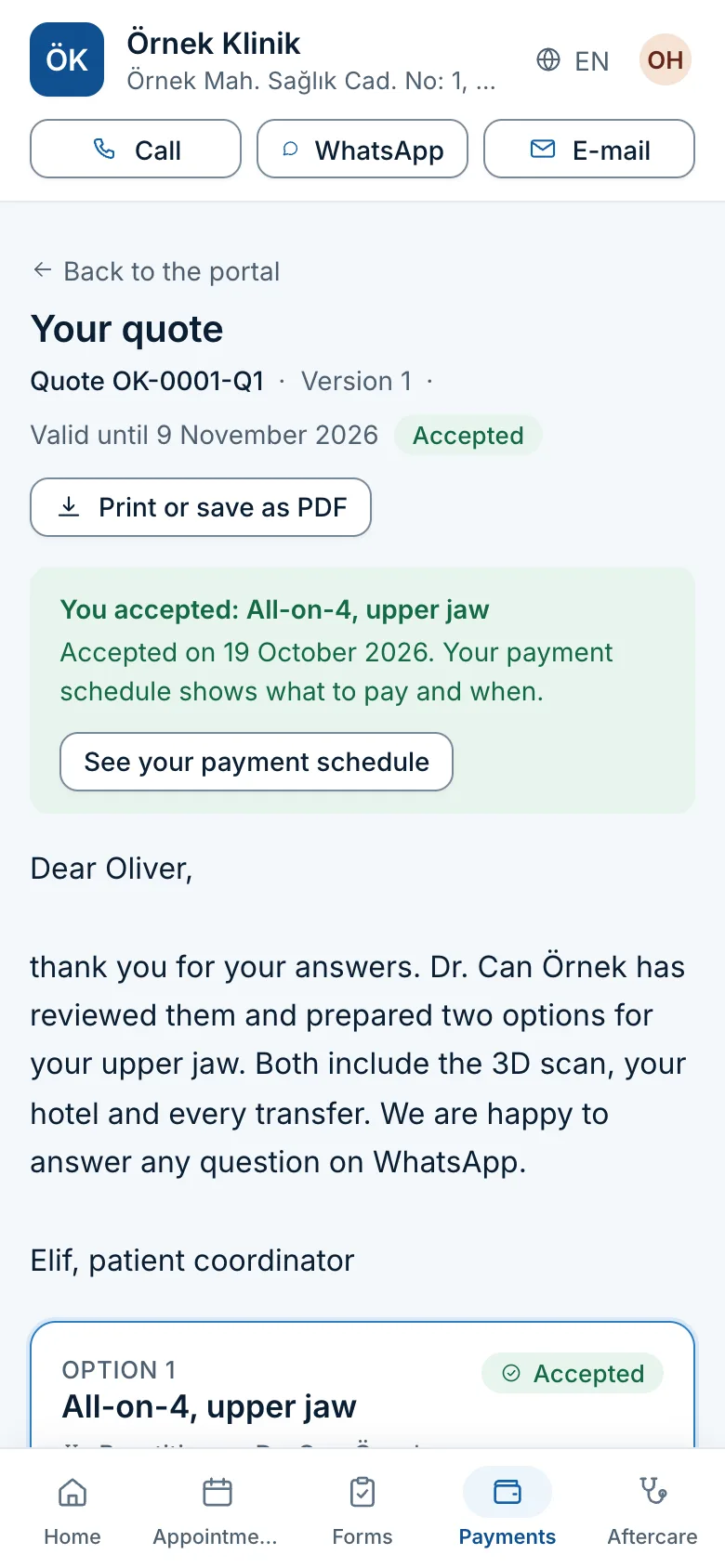
The quote goes by a secure link that opens in the patient’s portal. The first and last time the patient opens it are recorded on the case timeline as ‘viewed’.
List unopened and opened-but-not-accepted quotes
The quotes list offers ‘sent, not opened’, ‘opened, not accepted’, ‘expiring’ and ‘expired’ filters, and the list downloads as CSV.
Let an automation open a reminder task
In Settings → Automations, use the trigger ‘a sent quote has not been opened for N days’ with a task, assignment, tag, templated message or member notice (up to five actions). A rule only watches what happens after it is switched on and runs once per quote.
Prepare message templates
Templates fill in name, clinic, reference and member in the patient’s language. Messages go through the portal and e-mail; for WhatsApp there is a one-tap link on the contact’s record that opens with template text.
Remind the patient before expiry
In Settings → Patient reminders you choose how many days before the validity ends an e-mail goes (3 by default).
Close lost cases with a reason and report
Reports show quotes sent and accepted by source and service, with totals shown per currency.
Quote
Options, scope and validity in one quote
The patient compares and accepts the quote in the portal; you see whether it has been opened.
- Immutable versions
- A PDF in the clinic’s brand
- A reminder to the patient before expiry
Frequently asked questions
When should I write again if a patient does not answer a quote?
Within one or two days if the quote was not opened; within two or three days if it was opened but there is no reply. The next contact comes five to seven days later with something new. Measure and adjust the numbers on your own data.
How many times should I follow up?
Three or four meaningful contacts are enough in most cases. Each should offer something new; repeating the same message pushes the patient away.
Should I answer a price objection with a discount?
First ask whether the comparison is like for like. Cutting the price without a reason damages trust; offer an option by changing scope or by offering a payment plan.
How long should a quote be valid?
Set it by the doctor’s diary, materials and exchange-rate movement and state it in the quote. Send the patient a reminder before it expires.
When do I stop if the patient does not answer?
After three or four meaningful contacts and the validity date. Send a respectful closing message, close the case with a reason and leave the door open.
How do I know if the patient opened the quote?
Klinikbook records the first and last time a quote is opened in the portal on the case timeline, and the quotes list has ‘sent, not opened’ and ‘opened, not accepted’ filters.
Is a follow-up message a commercial message?
Giving information about a quote the patient asked for is different from promotion. Promotion needs consent. Clarify your messages with your lawyer and record the patient’s preference.
Never let a quote go unanswered
See that a quote was opened and open an automatic task for those that were not. 30 days free, no card needed.
Related reading
Free tools
30-day free trial
Try Klinikbook with your own team
Every feature is open for 30 days, and no card is needed to start.