
What is patient tracking software? Which kind do clinics and health tourism need?
Published 23 October 2026Reviewed 23 October 20269 min read
On this page
What does patient tracking software actually do?
A patient enquiry is not one event but a chain that runs for weeks: first message, intake, the doctor’s view, quote, deposit, appointment, treatment day, after-treatment check. Patient tracking software shows the next step and its owner at every link. It solves three things: no enquiry goes without an owner, no quote is forgotten unanswered, and the team looks at the same information.
The term is used in two senses. Some people mean the patient’s medical history by “tracking”, others mean the progress of the relationship with the patient. Decide which you are after before choosing software, because the two jobs are done by different kinds of software and fall under different rules, health-data law above all.
Which kind of software does what?
This comparison names no products; it compares kinds of product. Each kind is good at its own job. Trouble starts when one kind is expected to do another’s.
- Clinic records software (HIS, practice software)
- Strong atExamination and treatment records, prescriptions, invoicing, links to official systems
- Falls short onFollowing someone who is not yet a patient, quotes and reply speed, communicating with patients abroad
- FitsEvery healthcare provider that treats patients; it is a must
- Appointment software
- Strong atCalendar, online booking, reminders
- Falls short onThe stages before the appointment (quote, intake) and after it (aftercare)
- FitsAppointment-led practices with short visits
- General-purpose CRM
- Strong atSales pipeline, e-mail sequences, flexible fields
- Falls short onHealth-specific steps (intake, doctor review, consent, appointments) are built from scratch
- FitsOrganisations with someone to build and maintain it
- Patient relationship and operations platform
- Strong atEnquiry, case board, intake, quote, payment plan, appointment, trip, aftercare
- Falls short onKeeps no medical record; you still need records software for the clinical history
- FitsEnquiry-heavy clinics, international patient units, health tourism companies
- Spreadsheet and messaging app
- Strong atNo cost, instant start, total flexibility
- Falls short onNo reminders, task owners, permissions or history; lost enquiries grow with volume
- FitsSmall set-ups with a few enquiries a month run by one person
Isn’t clinic records software enough?
Records software comes into play once your clinic has accepted someone as a patient. The period before that, when a person asks for a price, sends photos, thinks about the quote and often writes to other clinics too, is not what those systems focus on. In most records software you cannot see where enquiries came from, how fast you replied, which quotes were never opened and how many were accepted.
The reverse also holds: patient tracking software does not keep, and should not keep, examination notes, diagnoses, prescriptions or lab results. Those belong in records software that meets record-keeping duties. To avoid entering the same data twice, a good rule is to keep only administrative information in the tracking tool: who, which service, which step, which date.
Which fits your situation?
- Fewer than 20 enquiries a month, one person runs it, no patients from abroad
- What usually fitsRecords software plus a well-kept spreadsheet; start with the tracker template
- Appointment-led, patients come in person, short quote process
- What usually fitsRecords software with its booking feature (most have one)
- Enquiries come from ads and social media, several people reply
- What usually fitsA patient relationship platform: you need owners, response targets and tasks
- Patients from abroad, quotes, deposits, transfers and accommodation
- What usually fitsA patient relationship platform plus records software
- Already on a general CRM and someone to build on it
- What usually fitsAdd the health steps to the CRM or move to a health-specific platform; compare the cost over a full year
- Several branches and teams, record visibility must differ by role
- What usually fitsA platform with role- and team-based visibility
What features should patient tracking software have?
- Lead form and source capture: which ad or page the person came from (UTM data).
- A case board: every enquiry at a stage with an owner; the team looks at the same board.
- Response-time targets and overdue alerts, so unowned and late enquiries show.
- Intake: a questionnaire, guided photos and a doctor’s review queue.
- Quotes: options, inclusions and exclusions, validity, acceptance and a “viewed” signal.
- Payment records and reminders (the money does not pass through the software; it keeps the record).
- Appointments, prevention of double booking, reminders.
- A patient portal and patient-language support.
- Reports: conversion by source, service and person; export.
- Role and visibility control, an activity log, a data processing agreement, server country and the ability to export your data.
Pricing models and what to watch
Understand the model rather than the price list; the real comparison is the total over a year.
- Per user per month
- How it worksEach person added raises the price
- Watch forDoctors, front desk and coordinators are all users; the bill grows with the team
- Per workspace (organisation)
- How it worksA set fee, plans with user and location limits
- Watch forWhat the limits depend on and what happens when you pass them
- Per location
- How it worksEach site is charged separately
- Watch forCan climb quickly for multi-branch groups
- Per record or volume
- How it worksBy number of contacts, enquiries or messages
- Watch forA busy ad month can bring an unexpected bill
- One-off licence plus maintenance
- How it worksPay up front, annual support
- Watch forWho is responsible for updates, backups and the server?
- Set-up and training fees
- How it worksOften added on top
- Watch forAsk for all line items in writing before you sign
Where does Klinikbook sit on this map?
Klinikbook is a patient relationship and operations platform for clinics, private practices, the international patient units of hospitals and health tourism companies. It runs in one flow from the lead form to the case board, from intake to the quote, from payment records to appointments, and from trips to aftercare, and its reports come from the same data.
Its limits, plainly: Klinikbook keeps no medical records, does no telemedicine, is not a marketplace, takes no commission and never holds a patient’s money. It has no link to e-Nabız or MEDULA; it does not replace your records software but works beside it. Patient messaging runs through the portal and e-mail; if you wish, you connect your own SMS and WhatsApp Business accounts and informational messages go out through them (Klinikbook charges nothing for messages). There is no chatbot. Pricing is per workspace, not per user; plan limits are on the pricing page and the 30-day trial needs no card.
How do you run Klinikbook beside records software?
Separate tracking from the record
The administrative flow, from enquiry to quote and from appointment to aftercare, lives in Klinikbook; examination, diagnosis and prescription stay in your records software.
Open the person once, in the right place
The enquiry starts in Klinikbook. When the person is accepted as a patient, they are opened in your records software; the case reference in Klinikbook can serve as a shared key between the two.
Keep appointments in one place
Whichever system you manage appointments in is the master; do not update both by hand. For patients from abroad the appointment is part of the trip, so Klinikbook’s calendar and trip plan help.
Take reports from Klinikbook
Enquiries by source, response time, quote acceptance and collections come from Klinikbook’s reports; clinical outcome reporting comes from your records software.
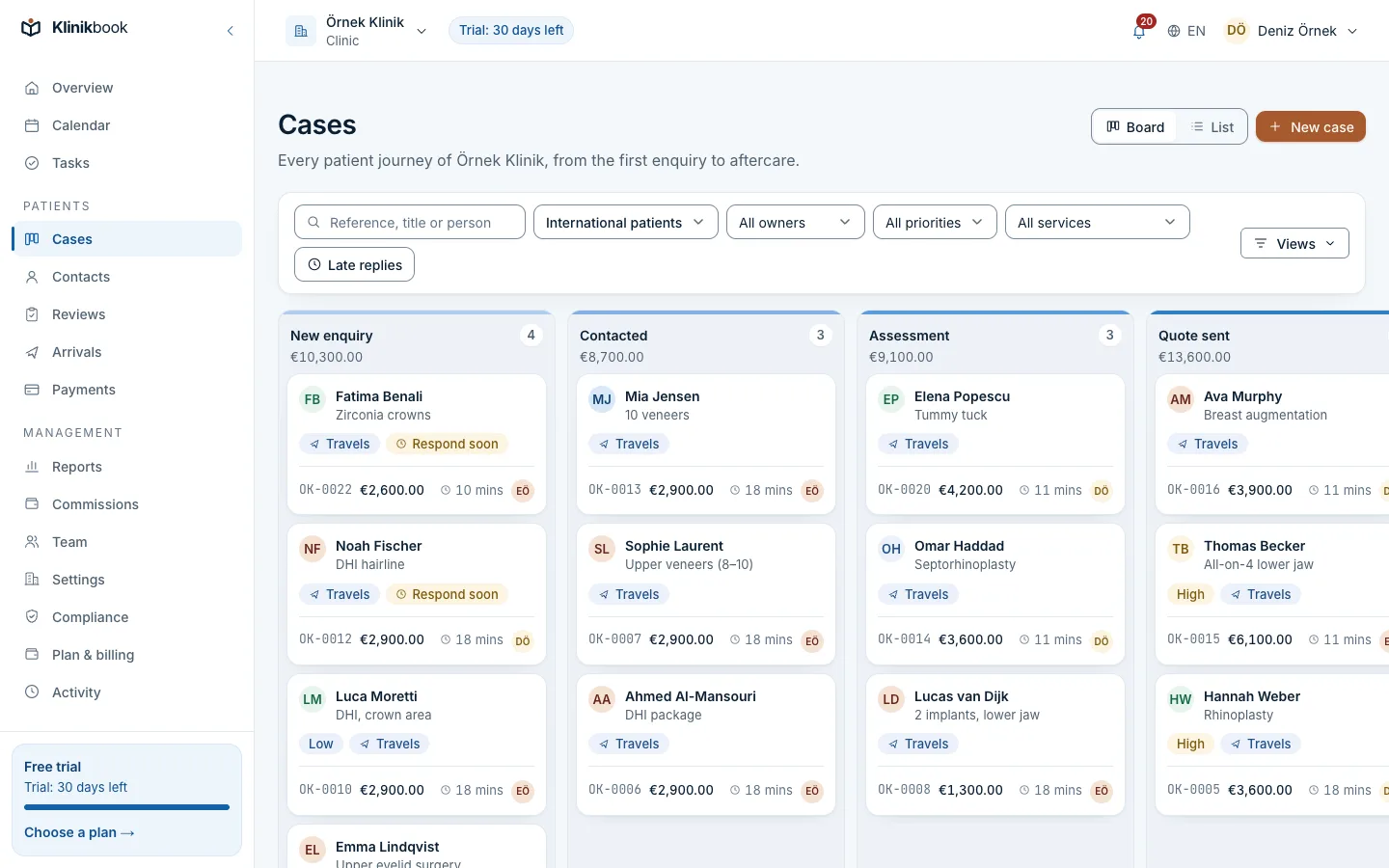
Case board
Every enquiry at a stage, with an owner
The board shows the team at a glance who needs to do what today, with overdue replies and unassigned cases at the top.
- Stages follow your clinic’s process
- Assign by hand or in rotation (round-robin)
- Response-time targets and overdue alerts
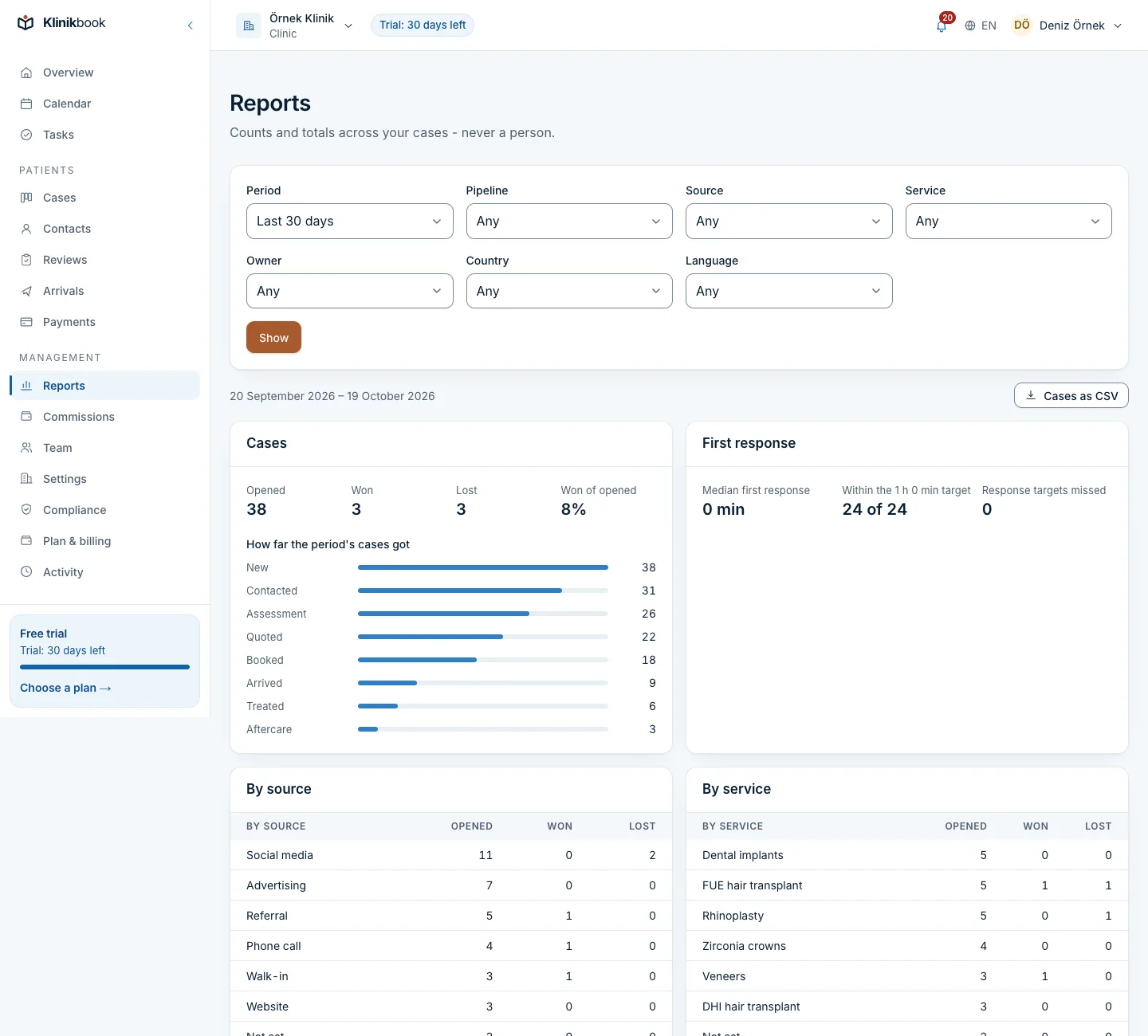
Reports
A measurable flow from enquiry to collection
Conversion by source, campaign and service, median time to first reply and to booking, no-show rate and collections by currency.
- Exports as CSV
- Follows record visibility rules
Comparisons and further reading
Try your own workflow for 30 days
Open a workspace without a card and run your own enquiries from start to finish before you decide.
Frequently asked questions
What is the best patient tracking software for a clinic?
There is no single answer; the right kind depends on your situation. If you only keep examination records, records software is enough. If you manage many enquiries from ads, quotes, deposits and patients from abroad, you need a patient relationship platform. Klinikbook is the second kind and does not replace records software.
Which CRM is used for health tourism?
Health tourism is long and multilingual: enquiry, photos, doctor’s view, quote, deposit, trip, treatment, aftercare. You can build those steps in a general CRM; a health-specific platform offers intake, quote acceptance, appointments and aftercare ready-made. Klinikbook takes the second approach.
Does patient tracking software keep medical records?
It should not. It follows the administrative flow (who, which service, which step, which date); examinations, diagnoses and prescriptions stay in records software. Klinikbook keeps no medical records and has no link to e-Nabız or MEDULA.
How long is a spreadsheet and WhatsApp enough?
While enquiries are few and one person runs them. Once several people reply, volume grows and quotes pile up, you get messages with no owner, forgotten quotes and source data you cannot see. The tracker template helps you get the discipline in place before you move.
Should pricing be per user or per organisation?
Both are common. Per user is cheap for a small team and expensive as it grows; per organisation gives a budget independent of team size, but you must check the plan limits. Klinikbook is priced per workspace.
Do I have to replace my records software?
No. Klinikbook does not replace it but works beside it. Your examination and prescription records stay where they are.
How do you measure whether tracking software helps?
Before you adopt it, measure today’s first response time, quote acceptance rate and no-show rate; measure again by the same method three months later. The clinic KPIs guide has the formulas.
Related reading
Free tools
30-day free trial
Try Klinikbook with your own team
Every feature is open for 30 days, and no card is needed to start.