
Patient management for private practice doctors: a low-cost setup
Published 23 October 2026Reviewed 23 October 20267 min read
On this page
Why does a solo doctor's patient follow-up fall apart?
The phone rings during consultations, messages scatter across WhatsApp, e-mail and paper, appointments sit in a diary and patient details in another list. The result is familiar: forgotten appointments, check-ups no one called about, the same question asked three times.
The fix is not an expensive system but a small, consistent routine: every patient a record, every record a next step, every step a reminder.
The five-part routine of a small practice
- Online booking page
- What it doesThe patient books while you are with another patient
- How to set it upEnter your visit types and opening hours, then add the link to your site, Google profile and messages
- Appointment reminder
- What it doesReduces no-shows
- How to set it upOne or two e-mails before the appointment; a confirm and cancel route in each
- Intake form
- What it doesYou have the information before the patient arrives
- How to set it upShort, with the questions the doctor really asks; inform the patient beforehand
- Check-up calls
- What it doesA check-up is not left uncalled
- How to set it upAfter treatment, the patient is invited on days you choose, such as day 1, 7 and 30
- KVKK records
- What it doesNotice and permissions are documented
- How to set it upA privacy notice, a record of explicit consent where needed, a retention period
How are appointments and reminders organised?
- Define your visit types (first visit, check-up, procedure) and the length of each; choose how far ahead patients can book.
- Let the patient book themselves; the appointment is confirmed at once or waits for your approval.
- Send an e-mail reminder before the appointment: date, time, address and a confirm/cancel link.
- A cancelled slot is freed so another patient can take it.
- Record no-shows; for repeat cases set a rule such as phone confirmation.
- See our guide on reducing no-shows for detail.
What belongs in the intake form?
- Contact details and preferred way of being contacted.
- Reason for the visit: short, in the patient's own words.
- The health questions the doctor genuinely needs; do not ask more, because health data is special-category personal data.
- The privacy notice and, where needed, explicit consent: let the patient see it before filling in the form.
- If photos are needed, a short guide on how to take them.
- At the end of the form, tell the patient what happens next: who will look at it, and when you will reply.
Check-up calls: follow-up nobody forgets
A check-up call is the cheapest and most valuable follow-up tool in a practice. On days you choose after a treatment or visit, the patient gets a short e-mail; they write how they are, can add a photo, and can say “call me”. A patient who does not reply lands with you as a task. Clinical assessment and when to come back are always the doctor's call.
Write the follow-up days and questions once and reuse them for each patient. Preparing a plan for your frequent procedures (for example a check-up visit, or after a minor procedure) is less work than writing each one by hand.
What does a private practice need for KVKK?
See our KVKK guide for detail, and ask your lawyer for legal advice. In summary:
- Give the patient a privacy notice that explains what data you process, for what purpose and on what legal ground.
- Health data is special-category personal data; processing beyond treatment (for example marketing or using photos in promotion) needs separate explicit consent.
- Send marketing messages only with the patient's separate approval.
- Know who holds the data: you are the controller for patient data; the software you use is a processor and a data processing agreement is needed.
- Set retention periods and delete data when they expire.
- Prevent unauthorised access: personal accounts, strong passwords, two-step sign-in.
How do you set it up at low cost?
A setup you can finish within three days:
Choose your practice and open the booking page
Choose the workspace type private practice; a location with opening hours, you as the doctor and a 30-minute first-visit type come ready. Put the link on your site and Google profile.
Bring your patients over
Import your patient list from Excel or a spreadsheet as CSV; a second record of the same person is caught.
Publish the intake form and the KVKK texts
The privacy notice and explicit consent are ready from day one; simplify the form.
Write your check-up plan
Define check-up days and messages once for your frequent procedures.
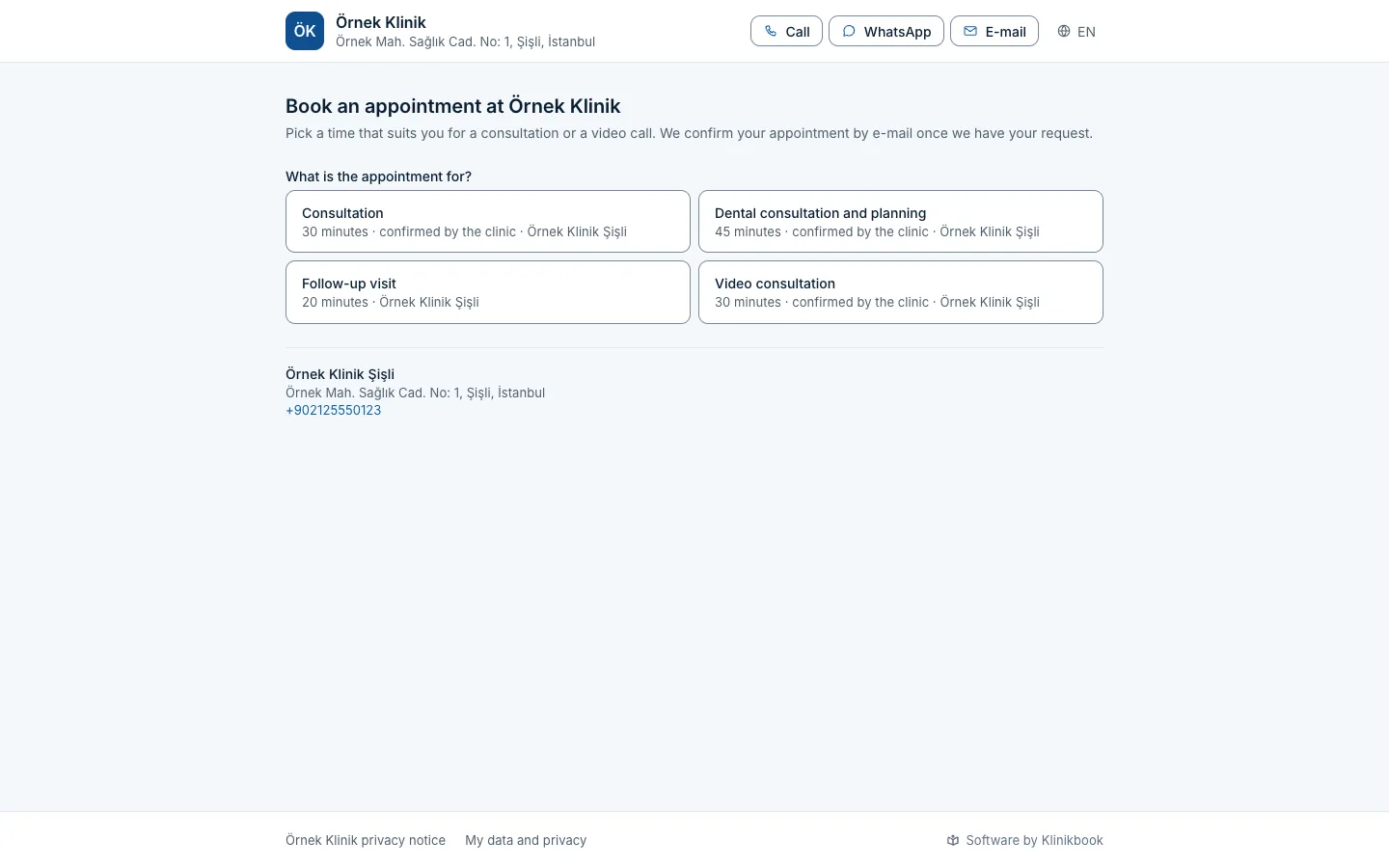
Booking
The patient books while you are in consultation
Your booking page shows your visit types, you with your title, and free slots; no prices and no reviews.
- Booking widget for your site
- E-mail reminders
- Confirm and cancel link
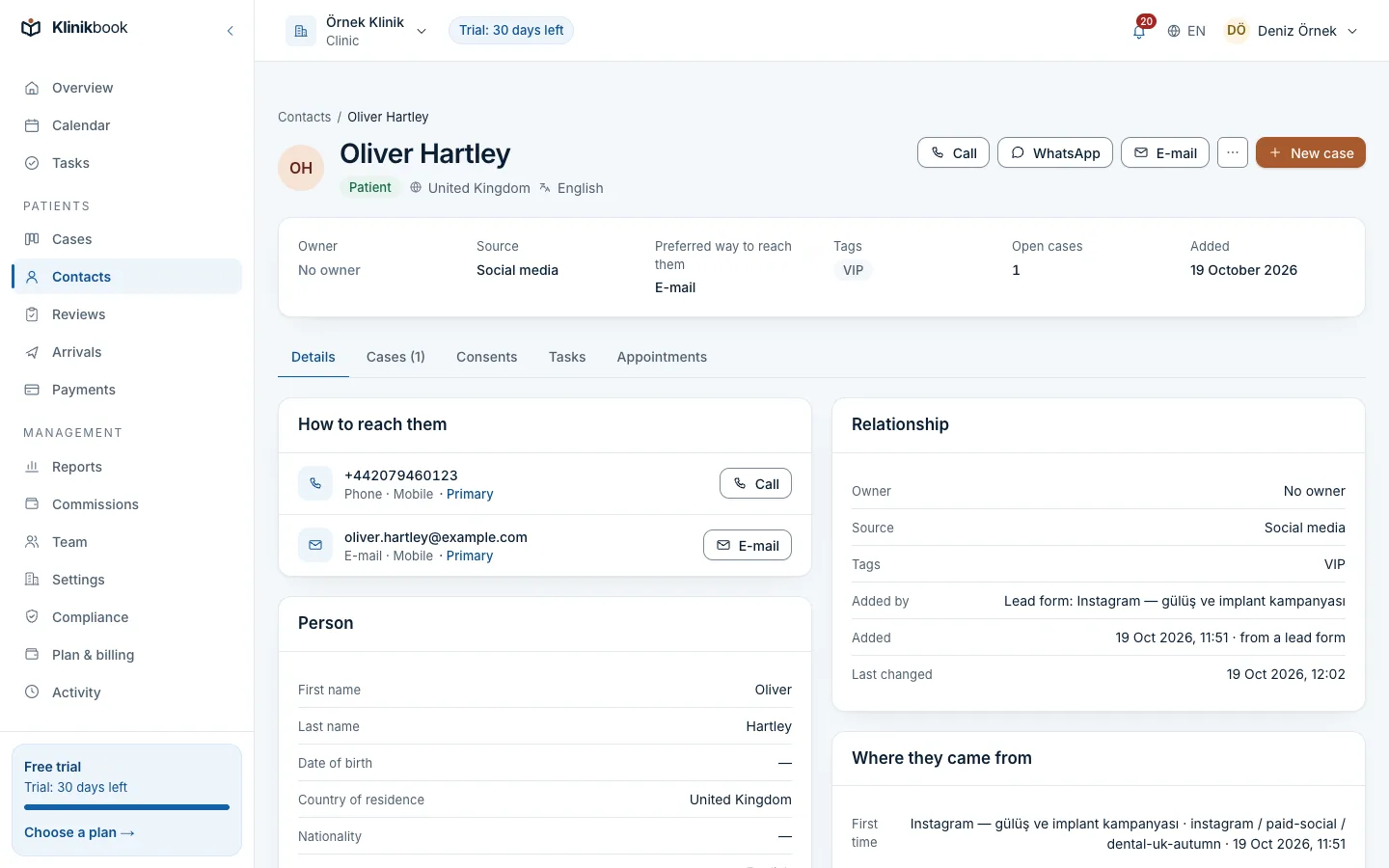
Assistant
Everything about the caller on one card
Contact details, permissions, appointments and no-show count on the contact card; call with one tap or write on WhatsApp.
- Import your Excel list from CSV
- A duplicate record is caught
- The assistant sees only their job
Start with the Solo plan
The Solo plan covers up to 3 users at a fixed price per workspace; every plan has every feature. 30 days free, no card needed.
Frequently asked questions
Does a private practice need patient management software?
It is not mandatory; but when appointments, patient details and check-ups are scattered, forgotten appointments and uncalled check-ups are unavoidable. A small booking and reminder routine is enough for most practices.
How big a team does the Solo plan cover?
The Solo plan covers up to 3 users: a doctor, an assistant and one more. The price is per workspace, not per user; see the pricing page for the current price.
Are appointment reminders sent by SMS?
By e-mail by default, up to three reminders per appointment, in the patient's language. If you connect your own SMS or WhatsApp account, reminders can go from there too.
Can a private practice share patient reviews or before-and-after photos?
The Regulation on Promotion and Information Activities in Health Services bans sharing patient thank-you and satisfaction statements in an advertising way (authorised international health tourism facilities may share them on foreign-facing platforms with documented explicit consent, Article 8). Before-and-after images are allowed only under the Article 7 conditions (explicit consent on the Ek-1 form, same environment and technical conditions, dates stated, no retouching). Read the regulation text and ask your lawyer before any promotion.
Does Klinikbook keep consultation notes and prescriptions?
No. The system you use for consultation notes, diagnoses and prescriptions stays. Klinikbook runs appointments, reminders, patient communication and follow-up.
What should a practice that will take patients from abroad do?
A practice that accepts foreign patients must also get a health tourism authorisation certificate from the Ministry of Health. See our authorisation guide for details.
Sources
- Regulation on Promotion and Information Activities in Health Services (in Turkish) — Resmî Gazete, no. 33075, 12 November 2025
- Law No. 6698 on the Protection of Personal Data (in Turkish) — Mevzuat Bilgi Sistemi
- Regulation on International Health Tourism and the Health of Tourists (in Turkish) — Resmî Gazete, no. 32882, 26 April 2025
Related reading
Free tools
30-day free trial
Try Klinikbook with your own team
Every feature is open for 30 days, and no card is needed to start.